Hello, how can I change the size of the images of the products so that they are displayed smaller?
Thanks!!
Hello, how can I change the size of the images of the products so that they are displayed smaller?
Thanks!!
Hi Mateo,
Thanks for writing to us.
You can change the image size from the Customizer. Go to Appearance -> Customize -> WooCommerce -> Product Images -> Thumbnail Width (Add the width here) -> Then choose required croping option from Thumbnail cropping.
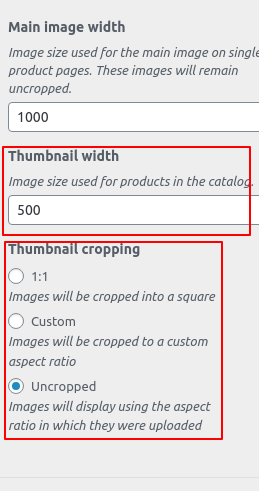
Here is a documentation
Hope it helps.
Thanks
Thanks, but I mean the page where all the products are seen, I would like to change the size of the images when all the products are displayed …
Hello Mateo,
The Shop page (Product List Page ) Image sizes can be configured under the Customizer. Go to Appearance > Customize > WooCommerce > Product Images as I have mentioned above. It is for WooCommerce Product archive or Shop page, Product Category and Product Tag archive pages.
You can have a look at WooCommerce documentation to learn more about Product Image Size
Thanks
Hello, it did not work for me, I would like to know how to change the font size of the names and the price of the products. I would also like the price to be seen without a line break, please can see the example page: https://vidagamer.com.ar/categoria-producto/juegos-ps4/
Thanks!!
Hi Mateo,
It seems that the Product Name font size has been already overridden with the custom code, you can adjust the font-size from there.
If you want to change the font size of price and the Product Name and price in the same line, you need to add a piece of custom CSS code in Theme Option > CSS.
.woocommerce li.product .entry-header .price > .amount
{
    font-size:12px;
}
.woocommerce li.product .entry-header h3
{
    display: inline;
    float:left;
}
Remember that the above code will work if copied as it is and don’t conflict with any existing style.
Please note that the code provided serves only as a guide to help you get started custom coding on your own if there’s no option offered in our theme or the products we bundle.
We do not provide support for custom codes that means we can’t fix it in case it conflicts with something in your site nor will we enhance it.
If you are not proficient with the code, I would suggest you hire a developer who can assist you to do the customization or you can avail of our newly launched service called One, where the customization questions are answered.
Thanks
This topic was automatically closed 10 days after the last reply. New replies are no longer allowed.
