Site crashes because of plugins, help ASAP!

Hi,

Site: http://www.soulsessionsoslo.com/
Problem: Plugins that belong to theme X, sliderevolution.
Wordpress and theme up to date.
Cleared cashed

My clients’ site crashes after I updated their Wordpress and theme X.
Slowly I found that the reason is that I may have interrupted the update somehow, but I got the site back up after error investigations. Currently, I have deactivated the plugin called ‘revslider’. I don’t dare to update any plugins as it has crashed my site several times now.

I have tried manually updating theme X, but my plugins don’t seem to work. I always end up getting Error 500 or the Maintenance message. The other pages doesn’t work either eg. About page! I really don’t know how I can fix this issue.

Please help me as I need it to be running this weekend!

Kind regards from a stressed girl, Monica

Hi Monica,

Thanks for writing in! First of all, I would suggest you to enable WordPress debug mode and then re-check your issue again. This will output actual error information to the screen, which will help you to identify the root cause of this issue. You can enable debug mode by following this guide here (https://codex.wordpress.org/WP_DEBUG).

Also I would suggest you to check the PHP version running on your server, which could be another possible cause. We recommend PHP v5.6.x or later to avoid incompatibility issues.

Let us know how it goes.
Thanks!

Hi!

Thanks for answering so fast!
See edit2 below!

Now I get:

Warning: include(/home/4/s/soulsessionsoslo/www/wp-content/advanced-cache.php): failed to open stream: No such file or directory in /home/4/s/soulsessionsoslo/www/wp-settings.php on line 84

Warning: include(): Failed opening ‘/home/4/s/soulsessionsoslo/www/wp-content/advanced-cache.php’ for inclusion (include_path=’.:/usr/share/php’) in /home/4/s/soulsessionsoslo/www/wp-settings.php on line 84

Edit:
I have now manually updated WP again through FTP.
I finally got the site more or less more normal now!! No weird errors from debug! It was the Cache in wp-config, had to set it to false. But now the Slider revolution won’t appear. Why?

Error when activating plugin:

Plugin could not be activated because it triggered a fatal error.

Warning: require_once(/home/4/s/soulsessionsoslo/www/wp-content/plugins/revslider_disabled/public/revslider-front.class.php): failed to open stream: No such file or directory in /home/4/s/soulsessionsoslo/www/wp-content/plugins/revslider_disabled/revslider.php on line 82

Fatal error: require_once(): Failed opening required ‘/home/4/s/soulsessionsoslo/www/wp-content/plugins/revslider_disabled/public/revslider-front.class.php’ (include_path=’.:/usr/share/php’) in /home/4/s/soulsessionsoslo/www/wp-content/plugins/revslider_disabled/revslider.php on line 82

Edit 2:
I reinstalled some plugins on Theme X, installed W3 cache plugin and now my site is running up more normally again!!! Yeij!

But I still get this error from Layer Slide plugin page:

License activation is required in order to receive updates and premium support for LayerSlider. Purchase a license or read the documentation to learn more. Got LayerSlider in a theme?

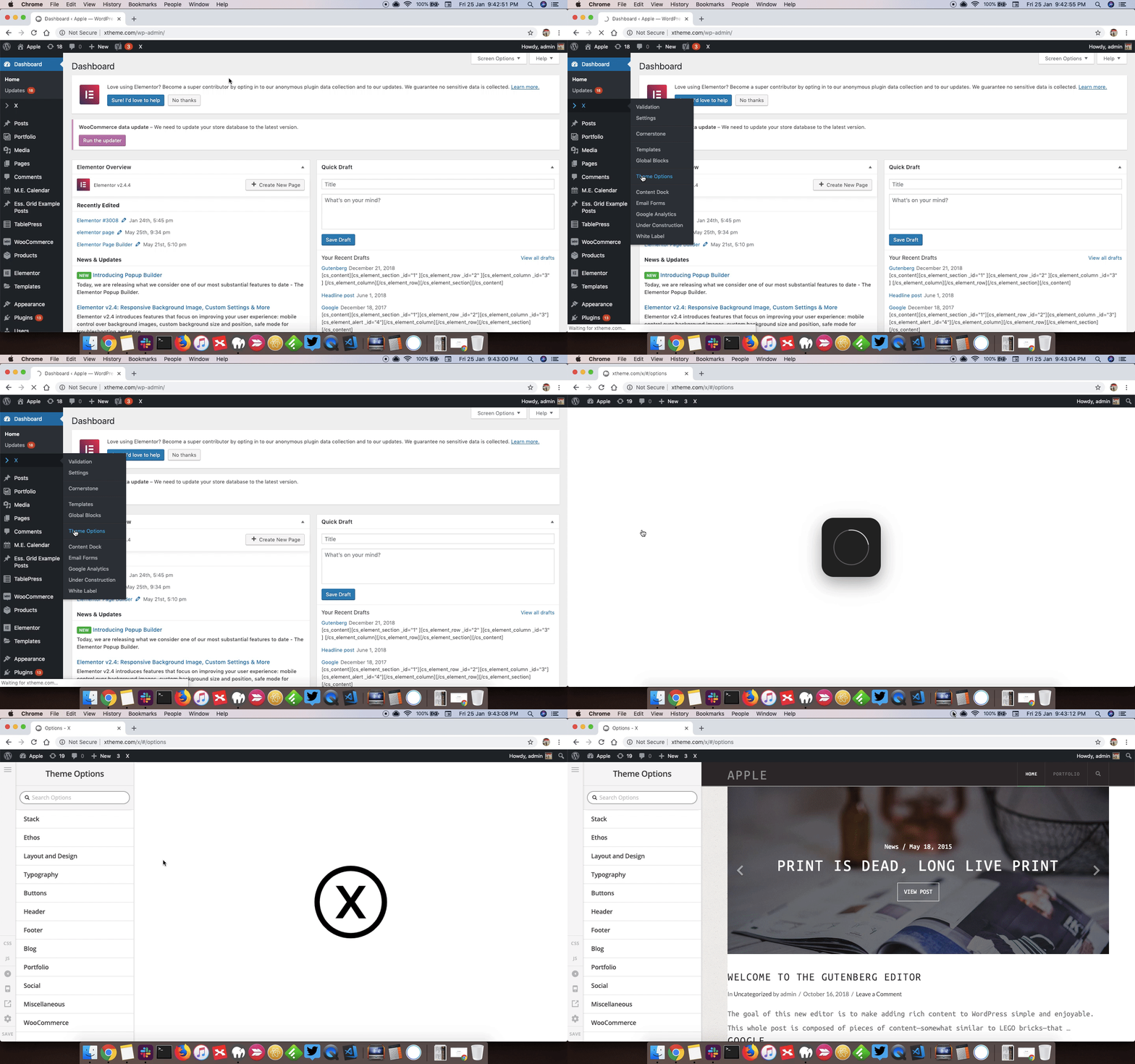
Also, when clicking on Appearance > Customize - before I could edit all in here, but now I am getting a button at the top saying I should edit further with Theme X Options. In there I can see the same options I got before inside Customize. Is this the new way of editing on Theme X?

Help please!
Hello Monica,

Thanks for updating the thread.

All the updates for Layer Slider plugin will be provided by Themeco. However, if you are looking for direct support for Layer Slider form plugin developer then for that you need to purchase licence from plugin developer. If not then you can ignore the message and continue using Layer Slider without any issues.

Please don’t use Customizer as X Theme now has it’s own Theme Options panel. You can access Theme Options from X > Theme Options. Here’s a screencast that you can take a look.

Thanks.

Hi!

Thank you for the answers! :smiley:

Really helped with the gif video. Thanks a lot for the clarification.
I managed to fix my site. Thanks for the fast support!

Have a nice day :blush:

You’re most welcome and have a nice day :slight_smile:

This topic was automatically closed 10 days after the last reply. New replies are no longer allowed.