Single Pages do not load in Pro Header Editor to choose

When I am in Pro Header no pages come in to the right to assign a header to. All I see (and I have scrolled all the way down as well as searched) is Lessons, All Courses (as whole only, not individual), All Posts, and Global.

What is happening?? I need to update the home page only and then another major page. But all the rest would be global. This is a huge site although I am on the dev site working right now. The live site is a mirror but not changing on there till I see it right on the dev.

Thanks so much. I have to say, I have not needed support for a long time but I have spent 2 days trying to work some issues out and I am whipped. :disappointed_relieved:

Noelle

Hi Noelle,

Thanks for reaching out.

Unfortunately, I can’t access the login page regardless of the URL. It says “Not Accessible”, perhaps there is a security that blocks access outside of the preferred countries.

Could you try disabling the plugins that are related to post types like lesson, and so on? Then please test it again, it could be the list is too long.

Thanks!

1 Like

Hello @Noellemena,

Thanks for writing in! Please be advised that there is a limit of a few thousand lines in the post type assignment. Since you have 40,000 lessons and courses, I would recommend that you place your site under construction first and then disable the Learn dash plugin or the plugin that give you the lessons/courses post types so that when you edit a header you will be seeing the pages instead where you can assign your newly built custom header.

Hope this helps.

Thank you @RueNel I will. The beta is always under that. We will let our members know for the main site.
Can you see my secure note above? It is just making the background image as a whole be under ALL bars
THANK YOU! Noelle

Hi Noelle,

You can edit your header and positioned the bar 1 and bar 2 as “Absolute” so that it sits on top of your bar 3. The bar 2 needs to have a margin top to accommodate bar 1.

Please check your header now.

1 Like

No problem.

UPDATE I FIXED THIS BUT would still like to know if it was possible. See my final comment too. :hugs:

@RueNel @Rad I have moved this to a page over on the main site here:
https://jeanneoliver.com/2019-header/
I had thought the login button in green all the way to the right was working correctly but it is not. It does not realize if you are already logged in or not. I search through the forum here and it seems you can not do that in PRO Header. (true?)

I went ahead and added a Login and Logout to the actual menu there and of course it works but can I get any kind of bolder feel for just that part of the menu?? We really want the LOGIN to pop out.

If I can get that, then I would ditch the green button that does not switch to LOGOUT.
**Although keeping the button and it actually working by showing LOGIN or LOGOUT would be perfect. :grin:

Thank you!!
Noelle

I would like to hear your response for that comment right above but I did find a work around. I deleted the button altogether and created a new additional menu and just put login/logout in the menu. Then customized the way it looked and it’s modal hamburgler. :rofl: It works.

I still would WAY rather see an actual button on mobile but unless your response has that method, I will stick with this.

Hi Noelle,

You did it right, add login/logout in the menu.

I checked in mobile and it seems you have also figure out how to add the login/logout button as well.

Have a great day! :slight_smile:

1 Like

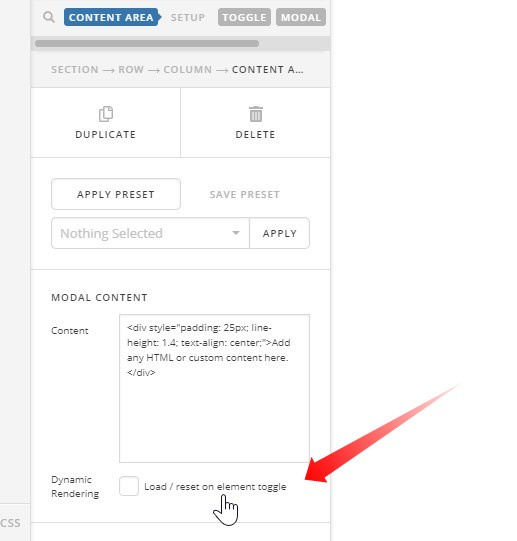
With the video in the content modal it is still playing audio if you just close the modal without pausing the video.
I have searched through and see where the trade off is to use lightbox and have to use an image instead of a button. :slightly_frowning_face:

Is this still the case? Sometimes time passing does not make what I read the case anymore. I want to be sure.
I saw this article for popup maker and wonder if there is something like this to target?

Content Modal is built into PRO Header and vimeo video is inside.

Thank you! :hugs:
Noelle

Hi Noelle,

Try to enable the Dynamic Rendering option.

Hope that helps

That worked perfect. :grinning: Thank you!

One last thing on this header! I have added one more bar and want this to always show. When I had designed this out using Rev Slider, I can control that the slider always shows this section of the page by using #masthead and 190px.
How can I do that with it now built using PRO Header?

I know it is too much to show on mobile but at least from horizontal ipad and laptops.
Thank you!
Noelle

Hey @Noellemena,

Regretfully, the setup isn’t straight forward in Pro header compared to using Slider Revolution where you just set the header class for the offset.

Slider Revolution has a script that does the offset dynamically.

That is not the case i Pro. In Pro header, you will need to use VH based Bar Height for 1 or all of your bars and you need to ensure your Bars content does not exceed the height of your bar. That’s not a problem in Slider Revolution as it automatically scales down the content.

If you wish to proceed with the setup, start by changing the top padding of your 2nd bar to VH. It’s currently using VW. Also reduce the bottom padding and if possible, switch to VH also.

Thanks.

This topic was automatically closed 10 days after the last reply. New replies are no longer allowed.