Since the Woocommerce cart/checkout page is a system page, I can’t edit it in cornerstone - any ideas how I go about getting the the thumbnail images to display at proper size?
Hey @tiernayoliver,
Before anything else, if you’re using a caching plugin or other optimization plugins, please clear all caches and deactivate all of them so you can see results instantly after changing settings.
After that, please first try going to Appearance > Customize > WooCommerce and under Product Images, resize the image dimensions to like 200x200. Then, choose 1:1 ratio.
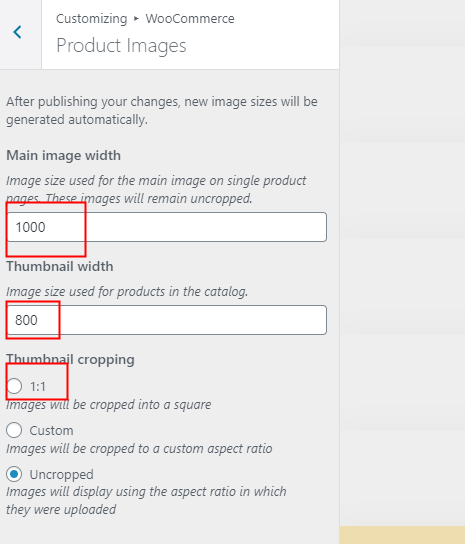
If that does not help, go to WooCommerce > Status > Tools and click on the Regenerate Thumbnails button.

Hope that helps.
Thank you, Christian - the first option resolved the issue. Thanks for your help
This topic was automatically closed 10 days after the last reply. New replies are no longer allowed.