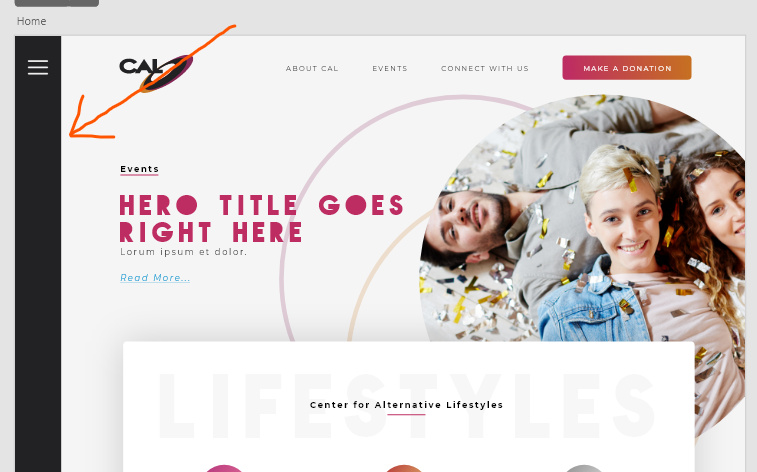
Sidebars and Cornerstone Updates

Hey hey!

I have a bunch of customized backend/middle-end “dashboards” where I use loopers and dynamic content to offer top-level content management, and one of the important features is the fixed sidebar.

The WordPress update did screw with a lot of things, so I’m following up now that it’s calmer, here’s what I’m facing.

In Pro 6.2 I seem to be having problems figuring out how to implement a sidebar. I’m used to different sections being located in/around the “outline” section, where did that move?

On another site, there appears to be a layout shift on the frontend, and things are looking to be massively screwy in the backend; it’s still running the hotfix but I want to make sure that I won’t kill things if I upgrade – and more importantly, I don’t want to have to rebuild each broken Cornerstone page if possible. I do see that it’s showing the topbar/sidebar element on the right, too, which is where the above confusion is sneaking in.

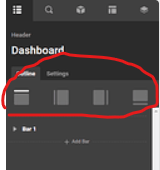
Hi @Rule72,

Thanks for reaching out.
To implement the Sidebar you can select any of the Page Template with the Sidebar option while creating any page. It is not very clear why you are trying it with the Headers. And for the Cornerstone issue, the WordPress admin login URL is not accessible, please share it again in the secure note.

Thanks

Sidebar is a bit confusing as a term. What I mean is the “bar element as a top or side bar element within Cornerstone” displayed under the page title on the second screenshot above but circled in red as NOT present in the first screenshot above… not the WordPress sidebar that’s controlled via page templates.

image

In my experience with Cornerstone it’s been present AS part of the header – and makes sense to me, as it’s a navigational element rather than an informatical element.

For clarity, here’s a mockup:

Also whoops, apologies for the /wp-login.php change oversight; I’ve updated the secure note.

Hi @Rule72,

I have checked the Cornerstone thoroughly, and I doubt that the Pro has not been updated properly, which is the reason behind your both the problems. I would suggest you deactivate and delete the Pro and reinstall it by downloading it from your Themeco Account once again, and check if that resolves your issue. If not, please copy your live site to a staging server so we can troubleshoot freely without breaking your live site.
And give us access to the secure note, including:

– WordPress Site URL & Login URL
– WordPress Admin username/password

To create a secure note, click the key icon underneath any of your posts.

Thanks

Thanks @tristup I’ll look into that angle! What’s the solve behind the missing vertical header bar?

Hello @Rule72,

Please go to the Settings tab and enable “Multi-Region” option.

Kindly let us know how it goes.

This topic was automatically closed 10 days after the last reply. New replies are no longer allowed.