Sidebar padding on regular page

Hi, I have added the sidebar to my page https://happysoulhungrymind.com/HWP/mind

However, the widgets are aligned to the right and the padding on the top of the page grew pushing the headline down, plus it pushed too much padding between the page content and sidebar content.

thanks.

Hello Ravi,

I have check your page and I can see that you have added a custom headline in your text widget.
You have this:

[custom_headline type="left" level="h2" looks_like="h3"]Join the Inner-Peace Community[/custom_headline]

Please have it updated in to this:

[custom_headline class="mtn" type="left" level="h2" looks_like="h3"]Join the Inner-Peace Community[/custom_headline]

We have added class="mtn" wherein mtn means margin top none. Once the custom class is in place, you should have this layout:
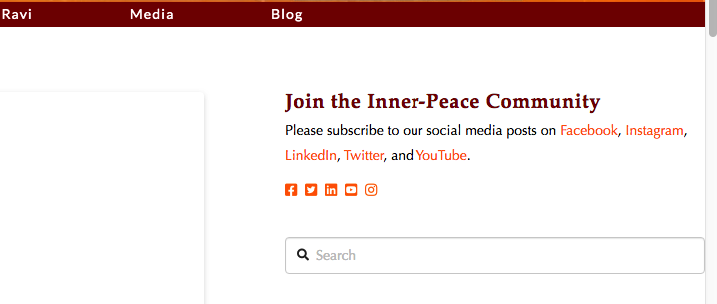
The space between the content and the sidebar is not a padding. It is the difference between the width of the content which is 69.536945% and for the sidebar is 25.536945%. When you add the two widths, you are left with 4.92611% and this constitute space. If you want to adjust the width, you can use a custom css code:

.x-main {
    width: 70%;
}

.x-sidebar {
    width: 28%;
}

This code will give you a 2% space in between the content and your sidebar.

Hope this makes sense.
Hi RueNel:

On my page https://happysoulhungrymind.com/HWP/test-2 the spacing needs help.

  1. The sidebar is sqooshed to the right (it needs padding on the right).
  2. Plus there is a lot of space around the content on the left side - I want to reduce the padding on the left and right of the content section
  3. There is a lot of space above the content headline. That space grew when I added the sidebar (changed the page template to have a sidebar).

Thanks.

Hello Ravi,

Thanks for updating in!

1.) The sidebar and the content were being pushed to the left or right because of this custom css:

.page-template-template-layout-content-sidebar .x-container.max.width.offset {
    width: 100%;
    max-width: 100%;
}

If you adjust the maximum width and make it only up to 96%, you will have 2% spacing on each side.

.page-template-template-layout-content-sidebar .x-container.max.width.offset {
    width: 100%;
    max-width: 96%;
}

2.) To remove the space around the content, please use this code:

.page-template .entry-wrap {
    padding: 0;
}

3.) The code above should also reduce the space above the post title.

Best Regards.

I did the changes, but there is still space above the headlines on the content side.

Actually, is there a way to move the headlines completely above the left content and the sidebar?

Thanks.

Hello Ravi,

You have inserted the code incorrectly:

--------------------------
.page-template .entry-wrap{
  padding:0;
}

You will need to insert only this code:

.page-template .entry-wrap{
  padding:0;
}

And no, you cannot move the title outside of the content area. It may only be possible with custom development which is already beyond the scope of our support.

Best Regards.

Thanks for catching the code error. I fixed it.

I still have blank space above the content and sidebar. https://happysoulhungrymind.com/HWP/test-2

Hi Ravi,

Please kindly add the CSS code below to X > Theme Options > CSS:

.page-template .entry-content {
    margin-top: 0;
}

.page-template .x-container.offset {
    margin-top: 0px;
}

The code above will remove the spacing at the top which is the offset there for the integrity stack.

Thank you.

Thanks Christopher.

Is there a way for the page headline to span both the content and sidebar. That will create more impact to have the headline above everything. Right now the sidebar competes for attention.

Thanks.

Hello Ravi,

You cannot expand the post title above the content and the sidebar. It is design to have the content area on the left and sidebar on the right. The featured media and the post title are inside the content area just like the image below:

Hope this helps.

Hi RueNel, I understand what you shared about a post.

I had asked the question regarding this page: https://happysoulhungrymind.com/HWP/test

It would be cool if the page headline could go above the content on the left and the sidebar on the right. If it cannot, I am still satisfied. Thanks.

Hello Ravi,

This page, https://happysoulhungrymind.com/HWP/test, is using Layout - Content Left, Sidebar Right page template. There is no way you can expand or reposition the page title like the way you wanted.

Thanks for understanding.

Thanks for your help.

You are most welcome.

This topic was automatically closed 10 days after the last reply. New replies are no longer allowed.