I have selected the page template “Layout - content right sidebar left” and the side bar still does not show. I have ensured I have updated to latest X theme and still no luck. Would appreciate any help with this! I am only really wanting to show the sidebar on one page in particular.
Hi there,
Depending on the stack you are using that option may not work. Please kindly go to X > Launch > Options > Layout and Design and make sure you set correct settings regarding the sidebar. also in the same option go to your stack options and see if there are some settings there that can help, especially for the Renew stack.
Hope it helps.
I’m using the renew stack and there seems to be 0 options for sidebars. Is that correct?
Hi Thomas,
Can you clarify your statement? I am not sure at the moment what options you’re looking for. The following options is available on all stacks. There’s only limitation on icon stack.
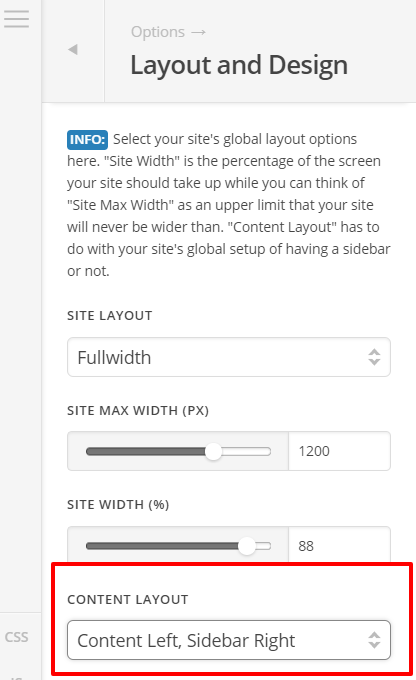
Under Content Layout: Choosing anything with sidebar will give you sidebar on all archive pages and single post pages. On normal page, to show sidebar, we still need to choose page template with sidebar. To add content on the sidebar, go to Appearance > Widgets. Default content is what was added on Main Sidebar. Now, can you clarify which options is missing or not working on your case? Thank you.