Shrink Logo transition not working

Hi again guys!

(you might be able to tell I’ve started a new project haha).

In my header, I’ve used JS (copied from the forum here) to shrink my nav button and logo image. The transition seems to be working for the nav button, button I cannot get it to work for the logo.

I’ve tried adding it to every possible div there is - I can’t find the controlling one.

Could someone take a quick peek and tell me where I need to be making these adjustments?

Thank you so much,
Tom
Hey @el3ctrofuzz,

First, please remove the custom code that you used as we do not provide support for custom codes. It’s also not needed for your case as there’s a Pro feature for it.

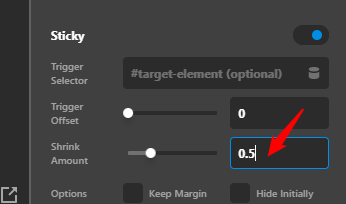
Next, update your Sticky Bar’s Shrink Amount to 0.5.

image

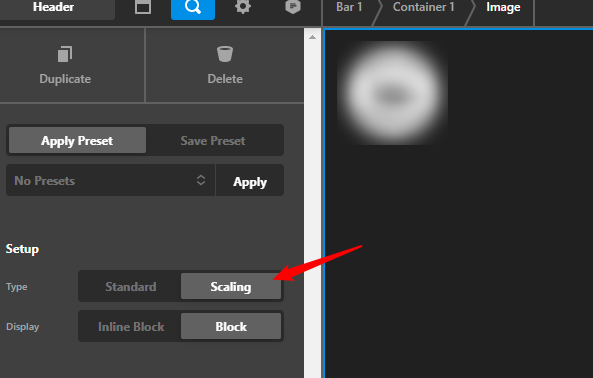
Lastly, set the Image (logo) element’s Type to Scaling and it will shrink out of the box.

image

Hope that helps.

Ah - of course. :man_facepalming:

I had tried this originally, but my brain didn’t consider that the shrink amount decimal as essentially being a percentage. I was trying to shrink more by increasing the number.

Thank you :slight_smile:

Hi @el3ctrofuzz,

Glad that we are able to help you.

Thanks

This topic was automatically closed 10 days after the last reply. New replies are no longer allowed.