I noticed that text boxes default to the code editor instead of the visual editor.
For the purposes of being easy to use for my non-tech savvy clients, how can I set all text boxes to default to the Visual Editor in Cornerstone?
I noticed that text boxes default to the code editor instead of the visual editor.
For the purposes of being easy to use for my non-tech savvy clients, how can I set all text boxes to default to the Visual Editor in Cornerstone?
Hello @santosfel5,
Thanks for writing in!
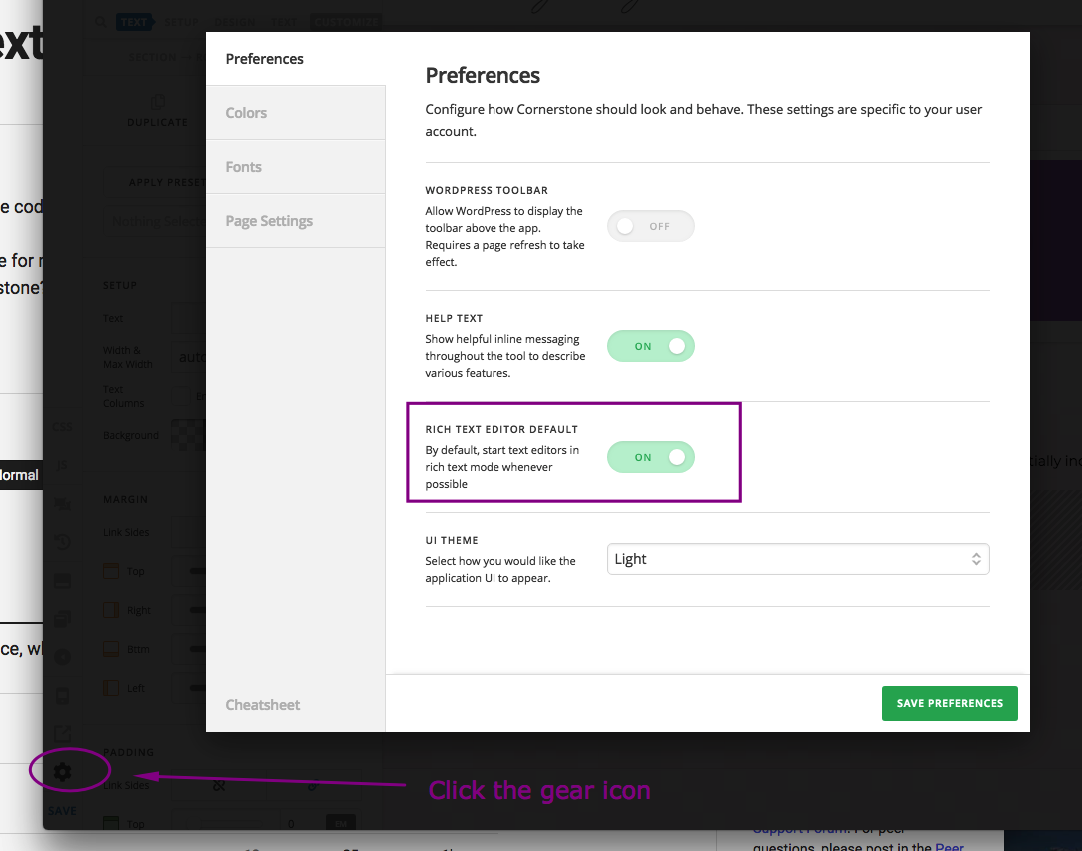
You can enabled the Rich Text editor by default by going to the preferences, X > Settings > User Preferences > Rich Text Editor Default
If you are editing in Cornerstone, you can click the “Gear” icon to be able to access the preference.
Hope this helps. Please let us know how it goes.
Thank you! That worked.
You are most welcome. 
This topic was automatically closed 10 days after the last reply. New replies are no longer allowed.