Set Background for new Section Element

Hello,

with the classic section element you can set a background image. It has an option that allows you to set one. However, the new section element doesn’t have this. How do you achieve the same thing, using only new elements? I want something similar to the “hero” area right at the top of the “Kingdom Church” demo page.

Hi there,

You could either use Revolution Slider or create a new section and add the image as the background of the section.

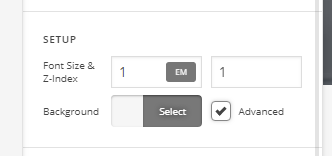
If you are not seeing the background image option, try checking the Advanced Mode setting and enable it.

Hope this helps.

1 Like

Hello @Jade

Thank you for your help! I found it now. The option is not very easy to find. There’s also an “Advanced” check in the sections setup area:

That has to be checked to see the option to have an image as a background with the new section elements. I’m not sure if by activating the “Advanced Mode” like you mentioned, will have this checkmark set by default? Anyway, I have my background image now! :slightly_smiling_face::thumbsup:

Hi,

Glad you were able to figure it out.

Activating “Advance Mode” will not make it default, you will need to enable it everytime you need to put a background.

Thanks

This topic was automatically closed 10 days after the last reply. New replies are no longer allowed.