Separator Bottom Curve Out Not Showing When I View on Smartphone!

Hi, I’m working on a website and the bottom separator I’ve used to curve out is showing fine on the desktop, but when I’ve checked it on my smartphone, it isn’t showing, it’s just a straight edge without a curve!

Here’s how it’s looking:

I’d appreciate any help as I have no idea why it’s not showing correctly!

I’ll put the admin login details in a secure note as I’ve got a maintenance page up.

Thanks!
Hello @core365,

Thanks for writing to us.

I checked your site on my android phone and it seems that it is working fine on my end. It might be the issue of the browser cache. I would suggest you please clear your browser cache and then check it again. I have tested it on the Google Chrome browser 108.0.5359.128 version.

Thanks

Hi @prakash_s,

Thanks for checking it. I’ve cleared my cache but it’s still the same.

I don’t know if it’s an issue with Safari, as I’m checking on my iPhone and iPad and the issue is the same for both. It’s strange though because I’ve used the separator curve two more times further down the page and they’re showing fine. It’s just the first one that curves into the slide container that there’s an issue.

Thanks

Hello @core365,

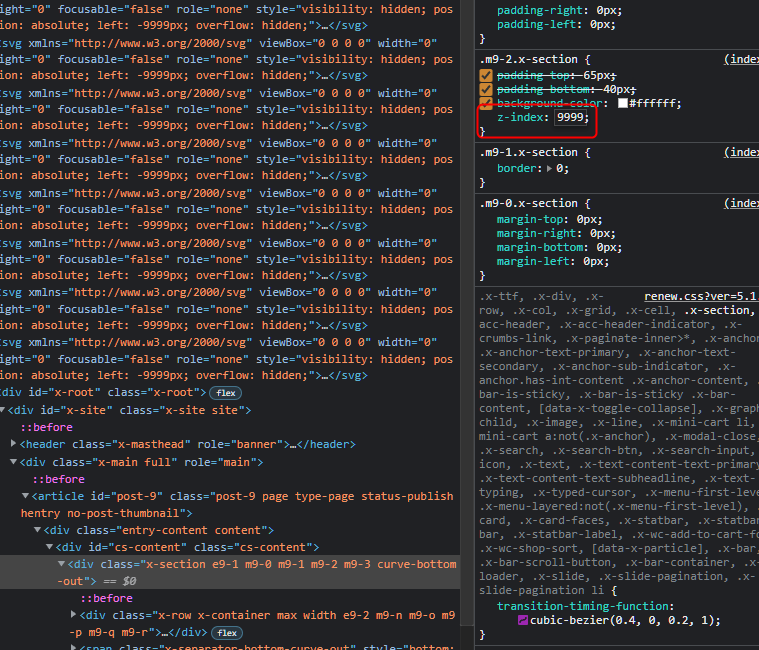
Please make sure to set the z-index property or your 1st and 2nd Section element. The Section that contains the separator should have a higher value. Therefore, the 2nd Section element must have at least 0 z-index property instead of just having it auto.

Best Regards.

Hi @ruenel,

I changed the z-index values and it’s still not showing correctly on my iPhone or iPad. I also cleared the cache before checking. I then changed the 1st section element z-index to 9 to see if it made a difference but it hasn’t. I don’t know how to correct this.

Thanks!

Hey @core365,

Please change the z-index of the first section to 9999. That works in my test. Values lower than that won’t work.

Thanks.

Hi @christian,

Thanks, I’ve changed it to 9999 and it has helped slightly! Now when I view it on my iPhone or iPad, it starts off with a straight edge, but when I go to scroll down the page, it changes to the curve! Is there any way of doing it so that it starts off as a curve and not the straight edge?

Thanks!

Hey @core365,

I’ve checked your website on iPhone and iPad then the layout starts as a curve, not as a straight edge. I suggest clearing your browser cache or any cache associated with your website.

Hope that helps and let us know how it goes.

Hi @marc_a,

I did clear my cache before checking, but it’s still showing a straight edge for me. I guess I’ll just have to accept it as it seems it can’t be resolved.

Thanks!

Hey @core365,

I suspect this only occurs on your end because the curve is working fine on our end.

Thank you.

Hi @marc_a,

Ok. Thanks for your time and help with this, it’s much appreciated!

Thanks!

You are most welcome.

This topic was automatically closed 10 days after the last reply. New replies are no longer allowed.