With the new content builder, it seems I cannot change a section background to transparent. It just turns white instead.
Any thoughts?
With the new content builder, it seems I cannot change a section background to transparent. It just turns white instead.
Any thoughts?
Hi There,
Upon checking my installation I cannot replicate the issue on my end.
The transparency works fine on the 3 levels of the section background (section background, upper layer, lower layer)
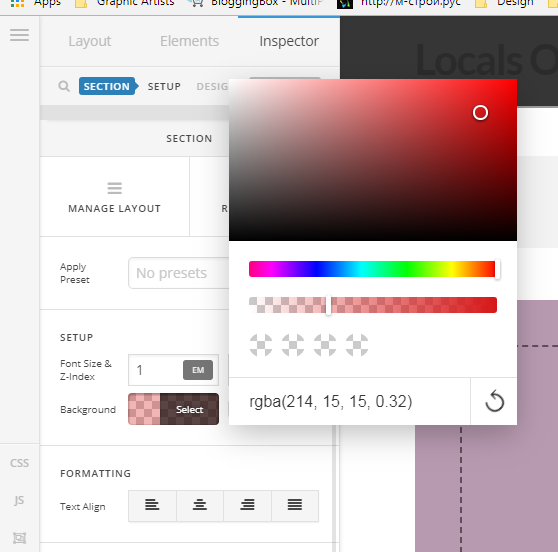
As before you can click on the color and under the color you will find a transparency settings.
Please take a look at the following picture:
Thank you
Well, you do not have an image set as your background in the theme settings, so you would not be able to see what I am talking about.
However, I fixed it with this global CSS class:
.x-main {background-color: transparent!important}
My website is https://enrageousdesign.com if you want to take a look.
I’ve noticed it does not affect the Classic Sections, only new ones.
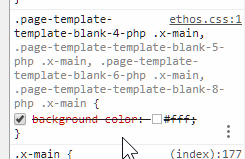
You’re using Ethos and it has a white page background by design that is why you need to override it with CSS.
Please provide details of your setup next time. You only said “section background” in your first post that is why @Joao assumed that is the only thing in your setup.
Thanks.
Okay.
Hi @nward85,
I am sure Christian did not mean to be rude, English is the for the most of us a second language, and written communication can be misinterpreted. He just advised you to provide more details in order that your problem gets solved faster next time you have an issue. Hope that clarifies the situation.
Can you clarify how did you add the background image? We would like to replicate on our installation so if we judge this functionality can be improved we will forward the issue to our development team.
Thank you
The background image was added through the theme customizer.
Hi there,
You said it’s fixed by this CSS
However, I fixed it with this global CSS class:
.x-main {background-color: transparent!important}
Which means it’s not related to the builder or customizer’s setting. It’s the default styling of ETHOS stack which is yes, it’s not transparent. I thought you’re referring to the transparency of section’s background. And yes, there is no setting that could change x-main background so your CSS is the only workaround, for now.
Thanks!
This topic was automatically closed 10 days after the last reply. New replies are no longer allowed.