Hi,
Why is the search icon going to the 2nd line?

Please check the secure note for the URL.
Thanks
Hi,
Why is the search icon going to the 2nd line?
Please check the secure note for the URL.
Thanks
Hey There,
Thanks for writing in! This particular situation is simply a matter of reworking your content to properly fit the physical limitations presented by the theme (this is a consideration that must be taken into account with all themes and designs). It is the same principal applied to filling up a room with furniture—there is only so much that can fit into a given space. The following should be considered in these situations:
Shorter Names – you should always shoot to have your top-level navigation links be as simple as possible. For example, if your link is “Learn About My Company,” Try using “About” instead. It conveys the same idea and will save you a ton of real estate.
Rearrange – sometimes we want to put all of our links in the top-level navigation, but not all pages are created equally. Pages of lesser importance that pertain to a parent link might work well as a sub-menu instead.
Less Links – even on more “complex” websites with lots of pages, there are always ways to combine information together to make things simpler, which also ensures that your user doesn’t have to click around for every granular piece of information. For example, you might have two top-level links called “About” and “Contact,” which could possibly be combined into one. This eliminates the need for extra links and makes things much simpler for your users to navigate. Less is more in information architecture.
Appearance – fortunately X features plenty of options for adjusting the appearance of elements throughout your site, and the navbar is one of the more flexible elements. Try using a smaller font size if possible to save on a little real estate.
Thanks!
Thanks for your long reply, did you check the site? It’s not about the long name it was fine even with the same name. I don’t remember what I have touched and now that’s appearing as like the screenshot. Could you take a look at the site?
Hi @abdurrehman,
The total width of the menu items is more than the max-width you set in your layout. To fix it, it’s either remove some items or increase your layout max-width to 1250px in Theme Options > Layout and Design.
Thanks!
From where I can remove the extra spacing with the current max-width?
Hi @abdurrehman,
I’m not sure what you mean, you don’t need to remove spacing, just increase the max width in your layout setup.
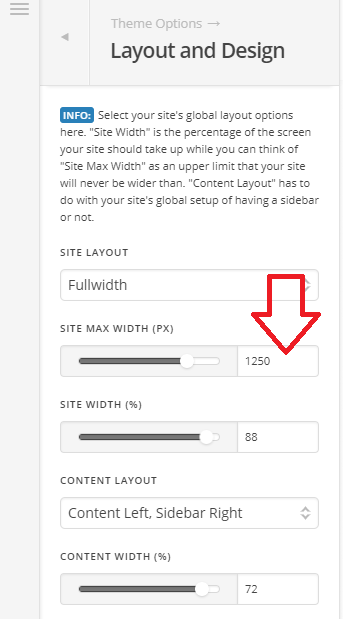
Thanks!
This topic was automatically closed 10 days after the last reply. New replies are no longer allowed.