on my web site www.irdi.ch
The search results is not working
It is linking to pages that do not exist
when it is it displays results with CSS such as i added in attachment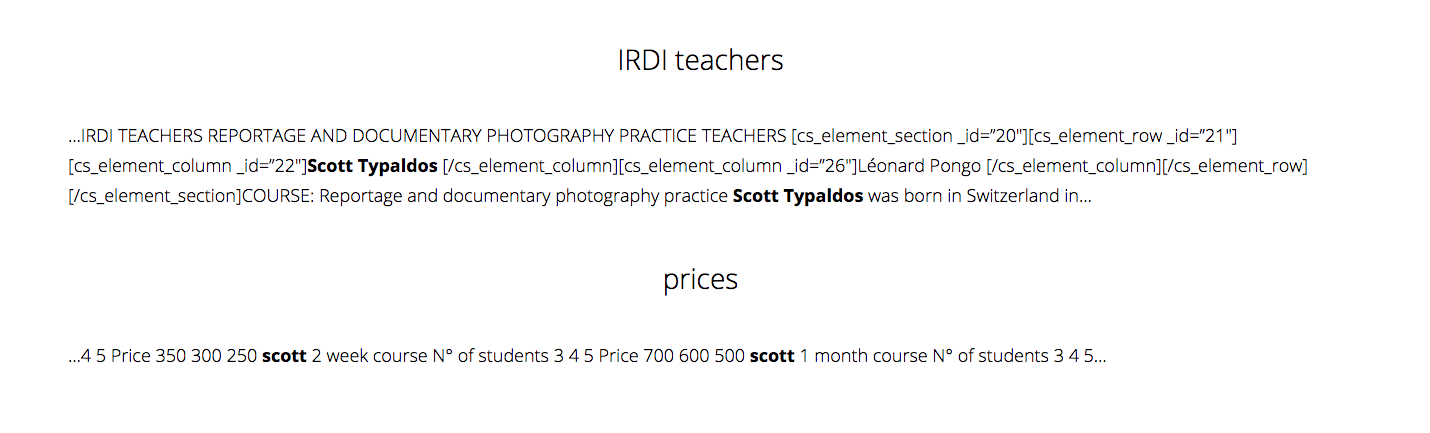
It might have to do with changes in permalinks but I made sure there are no dead links on my web site.
Hello There,
Thanks for writing in! By default, the search results will display post excerpts. In the excerpts, shortcodes such as Cornerstone sections, rows, and columns will not be rendered and most of the time, displayed as plain text. Pages will also be displayed in search results. And by default, page excerpts were disabled by WordPress.
There are two ways you can resolve this.
1.) You have to use manual excerpts including by adding a manual excerpts to all your pages. You have to turn in on by inserting this following code in your child theme’s functions.php file
// Add manual excerpts to pages
// =============================================================================
add_action( 'init', 'my_add_excerpts_to_pages' );
function my_add_excerpts_to_pages() {
     add_post_type_support( 'page', 'excerpt' );
}
// =============================================================================
To display the page excerpt, you may have to use the manual excerpts. To add an excerpt to a page, simply write one in the Excerpt field under the post edit box. Please see the screenshot below: http://prntscr.com/a57dbr
Excerpts are optional hand-crafted summaries of your content that can be used in your theme. Learn more about manual excerpts here: https://codex.wordpress.org/Excerpt
2.) Or we can insert a function where the shortcodes will be strip in all your page/post when displayed in search results. To do that, please add the following code in your child theme’s functions.php file
// Remove shortcodes from search page
// =============================================================================
function remove_shortcode_from_search($content) {
  if ( is_search() ) {
    $content = strip_shortcodes( $content );
  }
  return $content;
}
add_filter('the_content', 'remove_shortcode_from_search');
add_filter('the_excerpt', 'remove_shortcode_from_search');
// =============================================================================
Hope this helps. Please let us know how it goes.
I used the second code in the child theme but it removes my menu.
Hi,
Would you mind providing us with login credentials so we can take a closer look? Please provide following information:
Set it as Secure Note
- Link to your site
- WordPress Admin username / password
All the best!
Here it is
Hi there,
The search result is currently displaying a 404 page due to your Search plugin. Though, I understand that you wish to exclude pages from search result 
Back to the main issue, you should add an excerpt to your posts/pages manually. You can enable it by editing your post and scroll to the very top of the page and open Screen Options, then toggle on Excerpt. Then scroll down until you find the Excerpt section, then add your text excerpt manually. What you add there is what will appear on the search result or any archive pages.
Wordpress added that functionality as this issue could happen especially content could contain codes and shortcodes and it’s unavoidable especially when there’s a builder. And excerpt requires plain text only.
By the way, the 1st code is to add support manual excerpt for Pages which usually doesn’t have, with that, you can disable the search plugin and add an excerpt to your pages. Then search result could display pages with their excerpt.
Thanks!
when i do add the codes, my menu disappears.
By all means, please do read the entire thread otherwise we are just starting each time from zero.
This is quite counter productive.
s
Hi There,
Since the child theme is not active when I check, I cannot see why the menu disappear with that code. But it shouldn’t be. Others use a plugin to resolve this issue without custom code. See this thread: https://theme.co/apex/forum/t/search-result-with-essential-grids-code/11136/3
Let us know how this goes.
This topic was automatically closed 10 days after the last reply. New replies are no longer allowed.