Scrolling Stops at Certain Point on Homepage

Hi,

I have a new Pro X install here:
https://mayancabinets.com/

You’ll have to be logged in to view the site.

I’ve tested this on both Safari and Chrome on Mac and I’m experiencing the issue on both. When scrolling up or down on the homepage, it stops at the same point instead of scrolling all the way.

I’ve worked with dozens of X Pro installs and I’ve never run into this before… any ideas?

Hello Frank,

Thanks for asking. :slight_smile:

I checked the website and upon inspecting the page in dev tools I see the problem is similar to following thread. Please take a look at the solution mentioned in following thread:

Thanks.

1 Like

Hi - thanks for the quick response. I tried that but it doesn’t seem to be solving my issue… any other ideas?

Hi There,

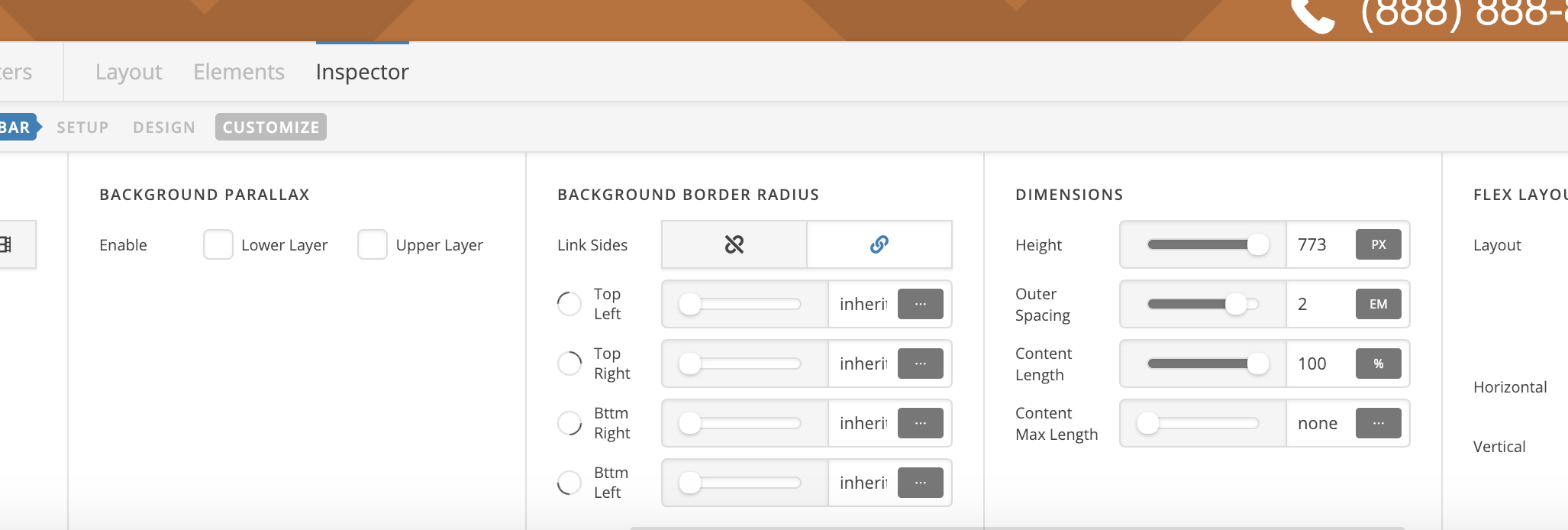
I’ve changed the height of background bar to 773px and it removed the second scrollbar.

As @Prasant mentioned in the previous reply, the second scrollbar appears because the height of footer bars:

Regards!

1 Like

That did the trick but how can I now add some padding to the bottom? Everything I try puts the scroll stop back…

Hi,

You need to increase the height of your “background” bar to have some space on the bottom.

Thanks

When I do that, the scroll stop comes back.

Hi Frank,

I have further increased your background height and that seems to be resolved your issue.

Could you please clear your browser cache and re-test this issue again.

Thanks!

I cleared cache but it’s still happening. You may not notice it on the scroll down, but scroll to the bottom and then scroll back up. You should see that it sticks like it did originally…

Hello Frank,

You are having this issue because of the way you have set up the footer background. The last bar footer which holds the footer background image is causing this.

I went ahead and edited your footer. I set the height of the last bar to 0 and hidden it in all screens to preserve your settings. I then added this custom css in the Footer > Custom CSS section:

footer.x-colophon {
  background-color: rgb(192, 112, 50); 
  background-image: url(https://mayancabinets.com/wp-content/uploads/2019/01/footer-bg.png); 
  background-repeat: no-repeat; 
  background-position: bottom left; 
  background-size: 1000px;
}

Please check your site again and you will notice a big difference. If you are satisfied with this results, you can totally delete the last bar footer.

Hope this helps.

That works PERFECTLY. I know that was likely beyond what you guys usually do so THANK YOU!

You are most welcome. :slight_smile:

1 Like

This topic was automatically closed 10 days after the last reply. New replies are no longer allowed.