Scrollbar - Really!

I am sorry everyone, but this is really getting frustrating and would love to have someone tell me what I am missing. I have been using X and X-Pro for a while know and this just seems to be ridiculous and continues to be a problem. I have looked on the forum to see if other are reporting this issue and don’t see anything, so, I am assuming it is something only on my side.

The problem is that the development scroll bars either don’t show up or you have to make an edit and then tab multiple times to enable them. Below is an example of what i am talking about and would welcome comments that explain how to change to enable or fix.
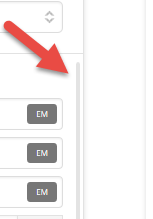
BTW: I still love X and X-PRO and only interested in making it even better!

Thanks.
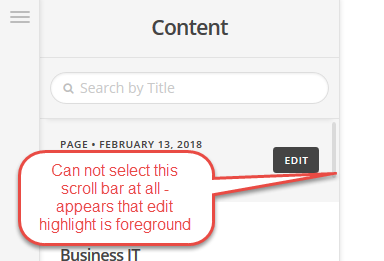
Hello @ctohelpsu,

Thanks for asking.

The problem you are facing is a bit strange. Can you please share website URl and login details in a secure note for us to take a closer look?

Thanks.

This is another issue i didn’t mention, but similar.

Hey @ctohelpsu,

Your site could not be reached (see Secure Note).

Are you also not able to scroll using your mouse’s scroll wheel. The scrollbar, though clickable, wasn’t really meant to be clicked because it is very thin. It is mainly for visual cue. If you happen to click on it, you need to click on the scrollbar’s right hand side. See https://youtu.be/iaIzh2KHSMM

The intended workflow is to use a scroll wheel or slide in your track pad.

If you’re using a touch screen, that could also be the case. The builder does not support touch screen or mobile device editing.

Thanks.

Really not sure what your point is about with the youtube video, I do know how to use a scrollbar!

I have been a developer across many platforms going back to CP/M and OS2 days using C/C++ and 4GL’s. The common theme I find with developers is they forget not everyone is going have the same exact equipment or environment. Why do you assume I would be using a mouse, mouse wheel?

I develop on my laptop and use the track pad, most of the time, and the inability to grab the scrollbar makes using the toolset very difficult. Why not develop the scrollbar to expand or inflate on hover from 2px to 10px, that way it could be usable.

I have also experienced the scrollbar not showing up until, for example, the list of options in the particular element forces the window to scroll down – then the scrollbar shows up and can be used to move the list.

Thanks for your help – remember I am not trying to be critical, I am an advocate trying to point out what I see as issues.

My point in the screencast is to show you that it is hard to click on the scrollbar.

Thank you for your feedback. I’ll post this to our issue tracker so our development team will be aware of your concern once they go through the list of reports.

I understand not all people are using the same equipment. But, most designers and even us developers use the scroll wheel or magic mouse on a Mac when working on a graphical interface.

The scrollbar will display once you hover over the work space.

That is my point, hovering will reflect the item being hovered over, BUT, the scrollbar does not always show up and is one of the points I am trying to make. If you are using a mouse wheel, you will never notice the defect (i.e. is why all physical hardware should be pat of the test case).

Sorry to deliberate over the issue, but spend a good amount of my career breaking stuff others thought was solid…old habits die hard.

No need to reply, thanks for all your help.

Hi There,

Sorry for the inconvenience, we’ve added this as a bug/enhancement so it can be taken into consideration for future development.

Thanks,

This topic was automatically closed 10 days after the last reply. New replies are no longer allowed.