Scroll Effects not working

I used a design you’ll recognize from the Design Cloud for this price list: https://capsaviation.com/capability/

I divided up the items into Tabs (using the Tabs element). Now the scroll effects/link child interactions are only working on the first tab. All remaining tabs don’t display those same effects.

Appreciate your help to fix this. Thanks!
Hi @capodanno,

All the content was loaded at a time, and that is why the effect can be seen in the first tab only.

Thanks

That makes sense for the initial scroll effects. Is there a way to fix that, so the effects are triggered when a new tab is opened?

And what about the color changes on hover - to the description, price and row border? Those aren’t working either. Are those “too deep” inside the Tab element to be able to hover? Or is there a solution?

Hello @capodanno,

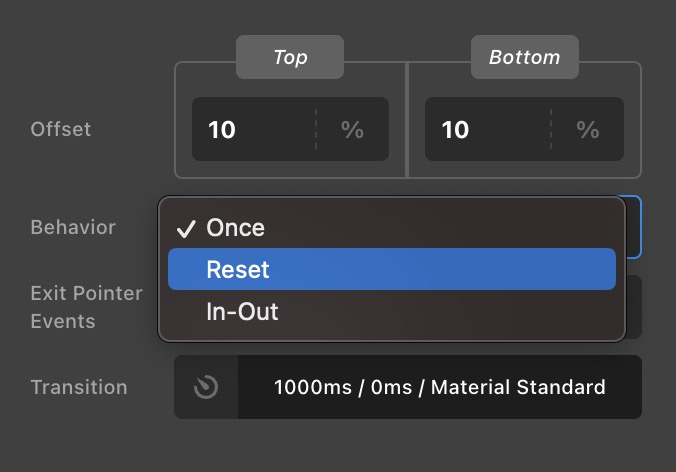
In your Effects > Behavior settings, user “Reset” or “In-Out”.
Screenshot 2023-05-19 at 11.22.19 AM

Setting it to “Once” will have the possibility that the Effect will get animated only once or could be while the first tab is loaded and that’s it.

Kindly let us know how it goes.

This topic was automatically closed 10 days after the last reply. New replies are no longer allowed.