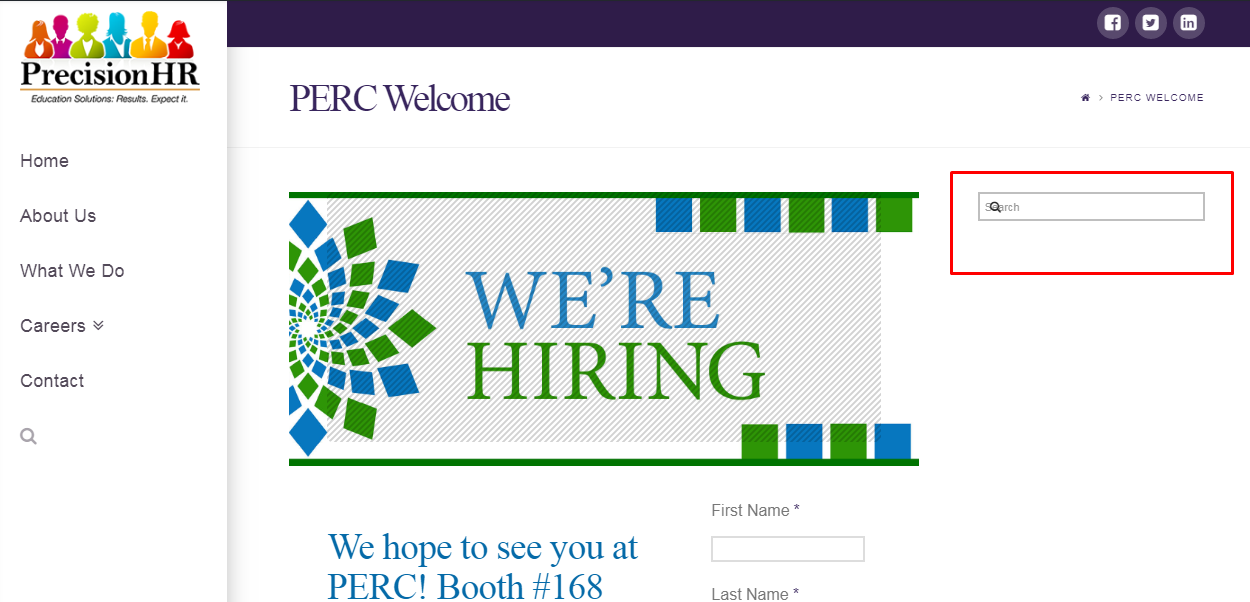
Saved template/new page has an added column/search bar

This was the original template and how the page should look:
http://precisionhr.net/careers/job-fairs-open-houses/

The search bar third column should not be there! Please let me know what can be done differently so this doesn’t happen when I try to make a new page. Thanks.

Hi there,

Thanks for writing in.

Would you mind providing your admin login credentials in a secure note? I like to check the actual builder content that has this issue.

Thanks!

I don’t see the hidden reply so I can send the credentials.

Hi there,

That’s the sidebar of your page and not from your templates. Try selecting another page templates, especially the full-width or blank page templates.

I went ahead and changed its page template to full-width.

Or does it happen when you import a template and it switches back to default page template? I tried that and it’s not happening. All templates should be manually selected.

Thanks!

I basically opened our events page and saved it as a template for future use in Cornerstone.
http://precisionhr.net/careers/job-fairs-open-houses/

So it should have matched when a new page was created from the template saved in Cornerstone.

Hi There,

Your page template settings are not included on your Cornerstone template.

So you need to click on Cornerstone Settings > page templates and select the same page template as the original template before or after inserting the Cornerstone template in order to make it look the same.

Hope it helps

OK thank you!

You are most welcome. :slight_smile:

This topic was automatically closed 10 days after the last reply. New replies are no longer allowed.