I have no idea what’s happened here. The Sale buttons on this testbed site have suddenly decided to have an oval border around them, cutting off a significant portion of them. See here:
This is also happening on the individual product pages, such as this:
https://csf.coastalmyst.com/product/korkers-devils-canyon-wading-boot/
Hello Myst,
Thanks for writing in!
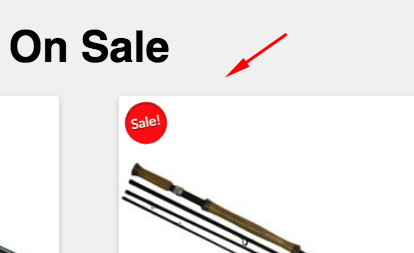
Please be advised that the normal sale buttons looks like this:
I can see that you have added this custom css which made the issue:
.woocommerce span.onsale {
    background: url(https://csf.coastalmyst.com/wp-content/uploads/2016/11/sale-ribbon-thin.png) no-repeat;
    transform: none;
    top: 0;
    left: 0;
    height: 173px;
    font-size: 0;
}
To have a perfect circle, your will need to add width: 173px; which is equal to the height. Hence, the resulting look will be like this:
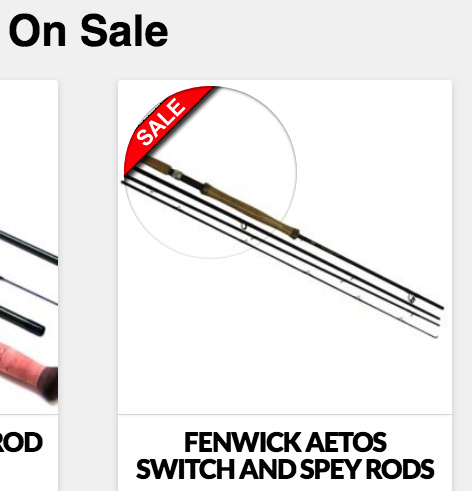
Still, this is does not look good. I would highly recommend that you updated your custom css and use this:
.woocommerce span.onsale {
    background: url(https://csf.coastalmyst.com/wp-content/uploads/2016/11/sale-ribbon-thin.png) no-repeat;
    transform: none;
    top: 0 !important;
    left: 0 !important;
    height: 173px;
    font-size: 0;
    width: 173px;
    box-shadow: none;
    border-radius: 0;
}
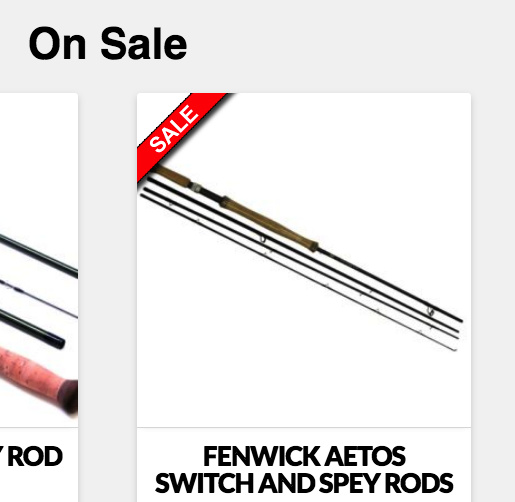
And the final look will be this:
Hope this helps.
This topic was automatically closed 10 days after the last reply. New replies are no longer allowed.