Hi!
I’m having a super slow loading time on iPad and iPhone for my portfolio pages. I haven’t tested on a Safari Desktop but I’m assuming the trouble is also there.
Is there something I’m doing wrong? Thanks!
Hi!
I’m having a super slow loading time on iPad and iPhone for my portfolio pages. I haven’t tested on a Safari Desktop but I’m assuming the trouble is also there.
Is there something I’m doing wrong? Thanks!
Hi there,
Thanks for writing in.
It’s slow in all browsers even on Windows, there are too many items and images loading at the same time. Plus, image size are too big. It’s either optimize your image and make them a bit smaller or use CDN service (like CloudFlare) to serve your image files to divide traffic in your site.
Thanks!
Hi Rad,
I did optimize all my images but there is still a great lag on mobile safari devices. Is there anything I’m doing that is doing this, or is it my server that isn’t fast enough or is there a limit of item I can display on one page?
Thanks!
mmm… The server speed can be a factor but I suggest that you first check the case regarding the elements themselves.
Kindly use the Template functionality of the Cornerstone which is explained at the end of this article:
Then add a new page and import the template to that new page to have the same clone of the page as a test one. Then try to remove the sections one by one from the top and test the case.
If you see a difference in performance for mobile devices while you delete a section you will understand that the rendering of that particular section is resource intensive.
Then I will suggest that you hide the section in mobile devices and use other another section for mobile and use lighter elements to convey the same material for mobile users.
To make use of the option you will need to click on the magnifying glass icon and you will see the options:
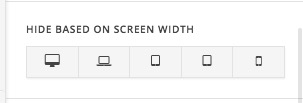
The next test will be to move your website to another hosting service provider to test the server speed:
https://codex.wordpress.org/Moving_WordPress
Thank you.
This topic was automatically closed 10 days after the last reply. New replies are no longer allowed.