Hi,
How can I make a row background image active? I have tried various JS code found in the forums but I can’t get them to work.
I am trying this on http://sitesample.co.uk/gallery/
Thanks
Tony
Hi,
How can I make a row background image active? I have tried various JS code found in the forums but I can’t get them to work.
I am trying this on http://sitesample.co.uk/gallery/
Thanks
Tony
Hi Tony,
Thanks for writing in! Please head over to X -> Cornerstone -> Settings page.

Then enable Advanced Mode under Preferences tab.

You will then be able to access those functionality when ticking advanced check box.

Make sure to clear your server cache as well as browser cache before testing.
Hope that helps.
Thanks!
Hi There,
I already had the background image, I just need to make this a link.
Thanks
Tony
Hi again,
Give your row a class e.g linked-row (see screenshot)
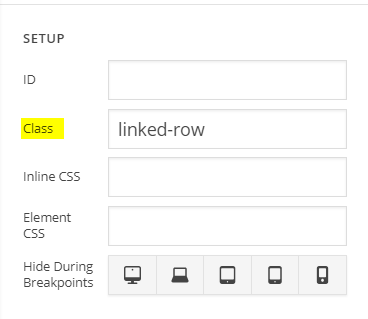
Then add the following code in the Theme Options > JS:
jQuery(document).ready(function($){
	var link = "http://theme.co/x/";
	$('.linked-row').wrap('<a href="'+link+'"></a>');
});
Don’t forget to clear your browser’s cache after adding the code. Let us know how this goes!
Perfect!!
Thank you for your help
Tony
Glad we could help.
Cheers!
This topic was automatically closed 10 days after the last reply. New replies are no longer allowed.