[RESOLVED] Marginless Columns - Button at Bottom

Hi all,

What is the correct way to force a button to appear at the bottom of each column in a Marginless Columns.

I can do it for Columns with Margins using https://michaelbourne.ca/create-columns-equal-heights/

I have tried a number of methods, but each seems flawed.

many thanks

Hi @markw1,

Thanks for reaching out.

Those are okay and should work. There are no available options that will allow that for the button, but customization like in that URL. Another workaround is creating it with the slider since the layers have the responsive offset.

The columns are simply a container and it expands depending on the amount of content, and the button is just the same as the other contents.

Thanks!

@rad - sorry I don’t understand your response.

Are you saying there is no way to get a button to sit at the bottom of a marginless column ?

I was hoping a simple class could be added with some CSS, to the button, then the button would sit say 10px from the bottom (vertically) in the middle (horizontally) of the marginless column

Hi There,

Thanks for writing in again!

Yes, you can make it through custom CSS.
Please follow the steps.
Please make the columns position relatives. You can add this code to each column element CSS.

$el{
position: relative;
}
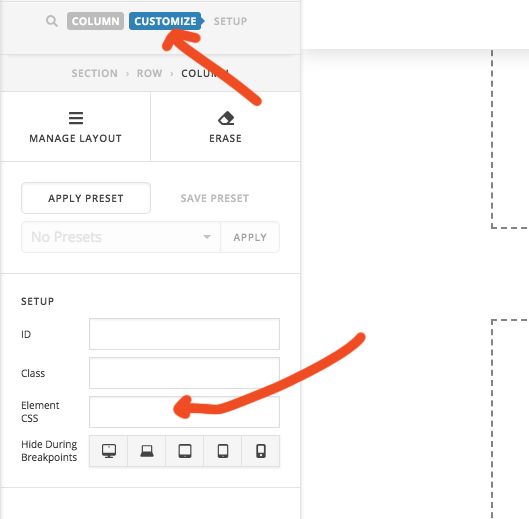
Then create one custom class name to buttons.
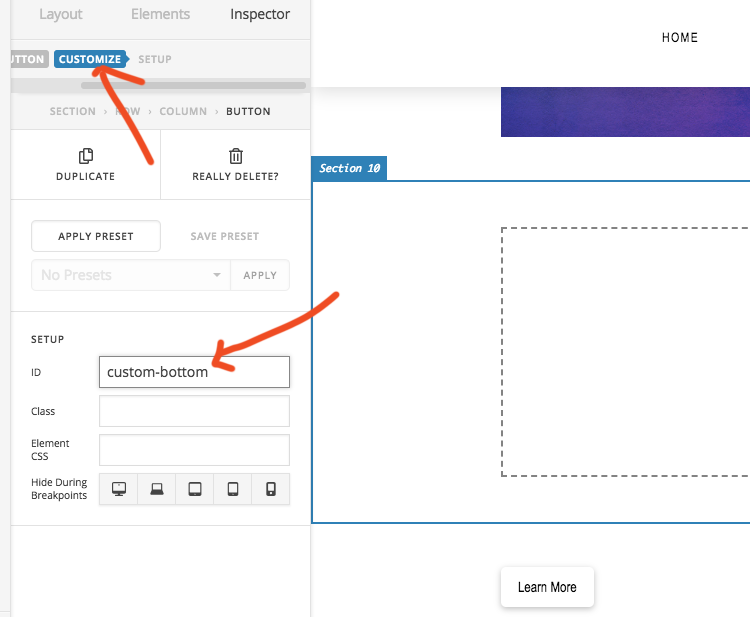
Then add this CSS in your theme option -> CSS

.custom-bottom {
position: absolute;
bottom: 10px;
left: 50%;
transform: translate(-50%); /* Standard syntax */
}

Hope this works!
Remember as mentioned by @Rad the column only depends on content. Uf you will add more content then you have to adjust it further.
As this is something custom CSS, we can’t help you further.

Thanks

@basanta thanks that fixed it.

I also added large margin to bottom of text, above button, to ensure enough space for button and works perfectly.

  1. add position: relative; to columns

  2. add large bottom margin to text above button. (to allow for button and wrapping text)

  3. add class to buttons custom-bottom

    .custom-bottom {
    position: absolute;
    bottom: 10px;
    left: 50%;
    transform: translate(-50%); /* Standard syntax /
    -ms-transform: translate(-50%); /
    IE 9 /
    -webkit-transform: translate(-50%); /
    Safari */
    }

Many thanks all :grinning:

Glad to hear it’s sorted. :slight_smile:

This topic was automatically closed 10 days after the last reply. New replies are no longer allowed.