I embedded a youtube vid in my about page and would like to make it fit the entire half of section that it is in. I tried using the responsive video shortcode but it got smaller and I would prefer it without the container surrounding it. How can I fix this?
Hi There,
On the Video Element, Click Frame and adjust the max-width and other parameters if necessary.
Also remove the container of the video in your case on the main video element tab.
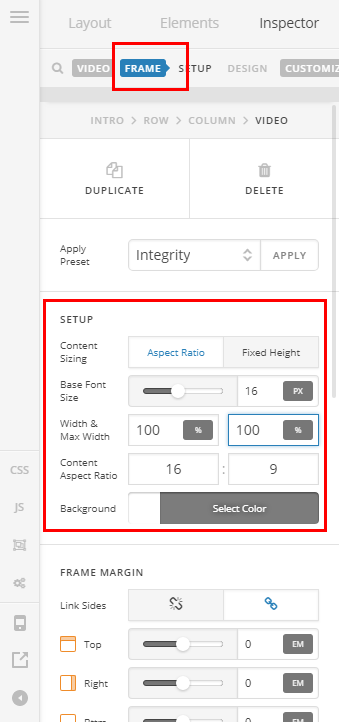
Hope it helps!
Thanks but that didn’t seem to work the video isn’t resizing.
Hello There,
Please keep in mind that the video width will depend on the width of its container. Right now, it is not expanding because you added an 8.5% padding around the column. If you remove this padding, the video width will occupy the whole column thus the spaces around the video will be gone.
Hope this helps.
Great Thank you!!
Glad to see we managed to help!
This topic was automatically closed 10 days after the last reply. New replies are no longer allowed.