Replicate page layout from blog

Hi,

I’d like to replicate the background layout of a single blog post to a specific page. If you look at this blog post you can see the main content is in an off-white block. If you look at this page, however, there is no background to the containing block.

Also the featured image is spread across the background (not repeated). The image I’m less bothered about but I would like to contain the content, including the sidebar, in that off-white background like a blog post.

Any help would be appreciated, thanks.
Hello @demonboy,

Thanks for writing to us.

To get a similar layout you need to follow these steps.

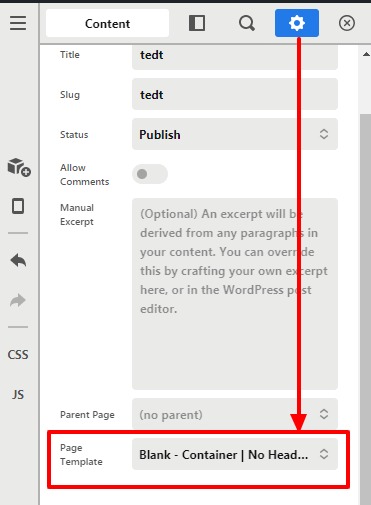
  1. Go to your page

  2. Set the page template as Blank - No Container | Header, Footer

  3. Add a section and then set the background image by using dynamic content code. It would render the featured image as a section background.

tedt-Content-q tedt-Content-q

  1. Add a section for the content and divide the column into 8/4

  1. Now in the 8 columns you can add your content and in the 4 columns, you can set the sidebar by using the Widget area element.
    sc

Hope it helps
Thanks

Thanks for your time, Prakesh.

You are most welcome @demonboy

This topic was automatically closed 10 days after the last reply. New replies are no longer allowed.