Hi,
I’m trying to figure out which settings have been used to create a menu like the one in the renew theme. The menu is collapsing downwards and not to the left or right and it is not overlaying the page.
Example: Renew Theme
Anyone can help?
Hi,
I’m trying to figure out which settings have been used to create a menu like the one in the renew theme. The menu is collapsing downwards and not to the left or right and it is not overlaying the page.
Example: Renew Theme
Anyone can help?
Hi @jannesth,
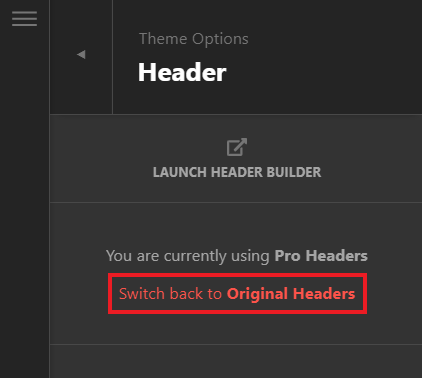
Thank you for reaching out to us. This is the default mobile menu of the X theme for all stacks. I believe you’re using Pro, if you want to use the original header then navigate to Theme Options > Header and click on Switch back to original headers:
Hope this helps!
Hi @nabeel,
thanks for you response. I have changed it now to the original headers but all menus are still collapsing either to the left or right. Solution for what I did wrong?
Hello @jannesth,
Thanks for updating in! When I check your site, this is what I am seeing:
In your last bar, you have several containers for the image logo, the left navigation and the right navigation. Are you expecting to see a different layout or can you please clarify by sending us a mock layout of how your menu should work for your site.
Thank you.
Hi @ruenel,
Sorry for the confusion. It is about the main fixed menu on the left, in the mobile viewport.
Hello @jannesth,
The Renew demo is using the default header while your site is using a custom header. Please be advised that navigation inline and navigation dropdown elements are best to use for desktop screens. For smaller screens, we highly recommend that you use the navigation collapsed or the navigation layered element instead.
Kindly let us know how it goes.
Hi @ruenel,
Thanks for your response.
I figured out a way how it may work, therefore I rewrote the whole section in “Brackets” from sketch and everything is working fine. Now I wanted to transfer it back to the Pro Theme. And I had a few difficulties, my main issue is to activate my jQuery in the Pro Theme.
In brackets:
<!DOCTYPE html>
<html>
<head>
<script src="https://ajax.googleapis.com/ajax/libs/jquery/3.4.1/jquery.min.js"></script>
<script>
$(document).ready(function(){
  $(".toggleHelper2").hide();
  $(".helperDropdownMenu").hide();
  $(".toggleHelper1").click(function(){
    $(".toggleHelper1").hide();
    $(".toggleHelper2").show();
    $(".helperDropdownMenu").show();
  });
  $(".toggleHelper2").click(function(){
    $(".toggleHelper2").hide();
    $(".toggleHelper1").show();
    $(".helperDropdownMenu").hide();
  });
});
</script>
</head>
<body>

<p>Additional Code: ToggleHelper Skript</p>

<button class="toggleHelper2">Hide</button>
<button class="toggleHelper1">Show</button>

<div class="helperDropdownMenu">I'm a div.</div>

</body>
</html>
In Pro I modified it a little.
Please make sure to select the new header “hd_jannesth_modified_to_renew” and then use the viewport SM 481px-767px for now.
I added the jQuery into the global JS file.
<script src="https://ajax.googleapis.com/ajax/libs/jquery/3.4.1/jquery.min.js"></script>
<script>
$(document).ready(function(){
  $(".toggleHelper2").hide();
  $(".helperDropdownMenu").hide();
  $(".toggleHelper1").click(function(){
    $(".toggleHelper1").hide();
    $(".toggleHelper2").show();
    $(".helperDropdownMenu").show();
  });
  $(".toggleHelper2").click(function(){
    $(".toggleHelper2").hide();
    $(".toggleHelper1").show();
    $(".helperDropdownMenu").hide();
  });
});
</script>
Then I added the classes toggleHelper1, toggleHelper2 and helperDropdownMenu to the classes section Select Element > Customize.
From that point on the js/jQuery does not work, any solutions?
Another question would be the sticky “Bar 5” has a standard animation while scrolling, where could I deactivate it? And my last question to get the same layout as the renew template is what do I have to add that only the currently selected page in the “Inline navigation” is stated in white and bold?
Many thanks in advance.
Kind regards, Jannes
Hi Jannes,
Please note that we do not provide support for customization, it would ultimately be your responsibility to take it from here.
Follow this documentation to enqueue a script. Please note that Wordpress has a built-in jquery, loading another one might cause a conflict.
Use the Navigation Collapsed instead, or if you don’t have a submenu you can try the Navigation Dropdown.
Thanks,
This topic was automatically closed 10 days after the last reply. New replies are no longer allowed.

