Renew - Pro Header "The Blog" Removed

Hello,

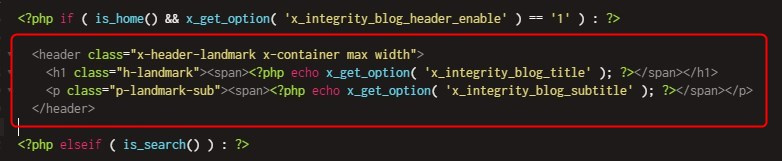
We have tweaked the tag in our Renew Theme in order to get rid of “The Blog” which was a duplicate H1 tag and just something we wanted to remove.

Can you have a look at the link included privately to tell us if we did this in a way you agree with? Also separately now that it is removed what should we do to reduce the vertical space that was left there?

Thanks!
Hey Tom,

It would be best that you delete the header landmark block completely. That it will also eliminate the space.

Hope that helps.

Hi @christian_y

I can’t see that code in any of the pages inside the integrity framework, please keep in mind that we’re on a X Pro, not just X, when we were on X with child theme, I was given this file: _landmark-header.php and asked to modify that.

  1. I don’t know where that file came from, is there a place where I can download those files?
  2. I believe we’re on the framework renew
  3. Since we’re on pro, and I created a pro-child, what file should I change, and what will that change be?

Thanks for your help on this.

Hi @onlineevolution,

I did check your post and yes you were able to remove the h1 landmark header.

The file that you’re looking for is the _landmark-header.php and it’s under \wp-content\themes\pro\framework\legacy\cranium\headers\views\renew directory, It does not matter if it’s PRO or X as long as you’re using the standard header.

Please bear in mind that we do not support customazation

I am not seeing that issue, would you mind providing some screenshot for clarification?

Hope that shed some lights,
Cheers!

Thanks for the reply, we were able to address the vertical spacing so that is no longer an issue.

Hey Tom,

We are just glad that you have figured it out a way to correct the said issue.
Thanks for letting us know!

Best Regards.

1 Like

This topic was automatically closed 10 days after the last reply. New replies are no longer allowed.