Just installed the Renew Bands theme and I’m having a few issues setting things up. This seems like it would be a super easy function but I haven’t been able to find a way to change the color or font of the top menu? Is there a way to do this without code?
Hello Shirley,
Thanks for writing in!
You do not need any custom CSS to change the font or color. Please go to X > Theme Options > Headers > Links
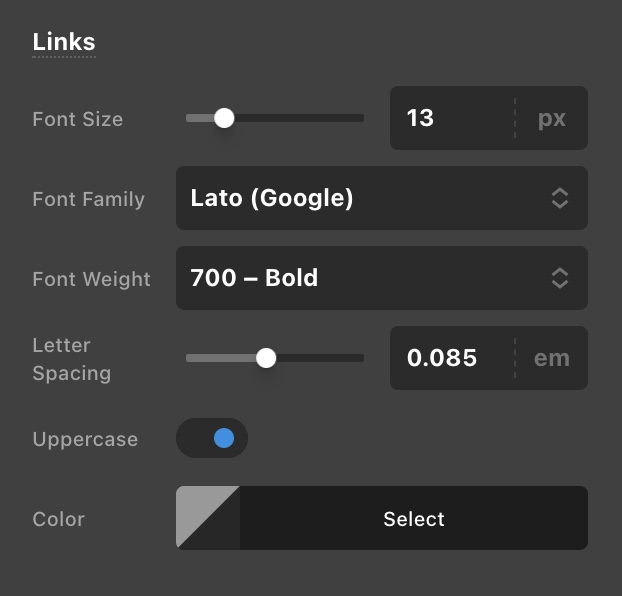
Best Regards.
1 Like
Thanks for the quick reply! Sorry for the delayed response.
So it’s probably right in front of my face but I don’t see the headers option.

Hi Shirley,
I checked your site listed in your Themeco Account and found that the Cornerstone is updated to its version i.e 5.3.1 whereas the X theme is still in the older version i.e 6.0.4. The issue you are having might be due to the incompatibility between X and Cornerstone. I would suggest you follow the below steps while updating the X theme and the Cornerstone.
- Delete the Cornerstone existing one
- Update the X theme to the latest version i.e. 8.3.3
- After deletion of the Cornerstone, please use the link in the dashboard to automatically install the Cornerstone.

Hope that helps.
Thanks
1 Like
Ah yes, that was it! It’s working perfectly now, thank you 
Hi Shirley,
You’re welcome and it’s our pleasure to help you! If you have any other concerns or clarifications regarding our theme features, feel free to open up a new thread.
Thank you.
This topic was automatically closed 10 days after the last reply. New replies are no longer allowed.