Renders different in cornerstone on URL

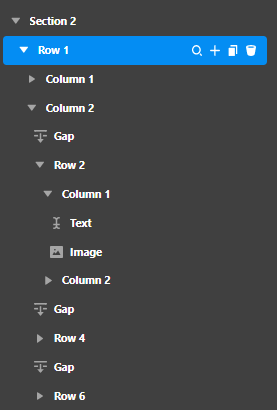
I created a page. I portion of the pace has a two-column format with two columns inside the right side column. In section 2, I added a two-column row. In column 2, I used the row element to subdivide that portion of the page into two rows. The page renders that way I want it to look in cornerstone; however, the live URL looks completely different.

Can you take a look please, and tell me what I should do differently

Here is the cornerstone structure
image

The URL is https://ashi-elections.com/wp/about-mark/

I will provide you with access information just in case you need it in a secure note.

As always thank you in advance for your assistance.

I did try an alternative method of creating the page and got the problem section to display the same as it renders. However, now in section 3 the bottom three columns no longer render as columns. That URL is https://ashi-elections.com/wp/test-about-page/

Hello @mark2inspect,

Thanks for the very detailed information. You are having the issue because you have inserted a broken HTML code.

1.) In your Text element, you inserted this:

<div>
<span class="my-header-1">Primary</span>
<span class="my-header-2">Tasks</span>
</div>

Always make sure that you open and close the <div> HTML tag properly. In some elements, you have have left out to closed </div> it. Instead of using a Text element, use the Headline element instead and only use:

<span class="my-header-1">Primary</span>
<span class="my-header-2">Tasks</span>

2.) You also have added this broken HTML code:

<div>
<p style="font-weight:800; color:black;">Lorem isump dolor sit amet, consec tetuer adipiscing elitraesent vestibulum:</p>
<p><ol>
<li>Aeneannonurmmy hendrerit maurus the lorem</li>
</ol>

You forgot to closed the DIV tag. Instead of using the Raw Content element, just simply use the Text element and only put plain text. If you need list items, use the Rich Text format when inserting the content.

Hope this helps.

Thanks for the assistance.

You are most welcome, @mark2inspect.

This topic was automatically closed 10 days after the last reply. New replies are no longer allowed.