I can’t seem to remove the borders on the menus. I incorporated a
border: 0; but that doesn’t seem to remove the borders around the menus.

I can’t seem to remove the borders on the menus. I incorporated a
border: 0; but that doesn’t seem to remove the borders around the menus.
Hello @aa2zz6,
Thanks for asking. 
Please add following CSS under X > Launch > Options > CSS to remove border from menu:
.x-navbar .desktop .x-nav > li > a > span {border: 0 !important;}
Thanks.
Hi there,
what do I have to do, to remove the whole navbar?
regards,
Christian Arns
Hi There,
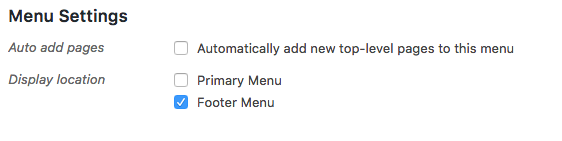
Head over to Appearance -> Menus and select your menu from the list.
Then under Menu Settings, untick the primary menu option.
Also add the following CSS rule into your Theme Options > Global CSS area.
.x-nav-wrap.desktop, x-btn-navbar {
    display: none;
}
Hope that helps.
thanks! perfect.
You’re most welcome!
This topic was automatically closed 10 days after the last reply. New replies are no longer allowed.