Removing elements of a essential_grid post

I am using the renew stack with essential grid installed. I need to remove a few elements (not cornerstone) from the essential posts.
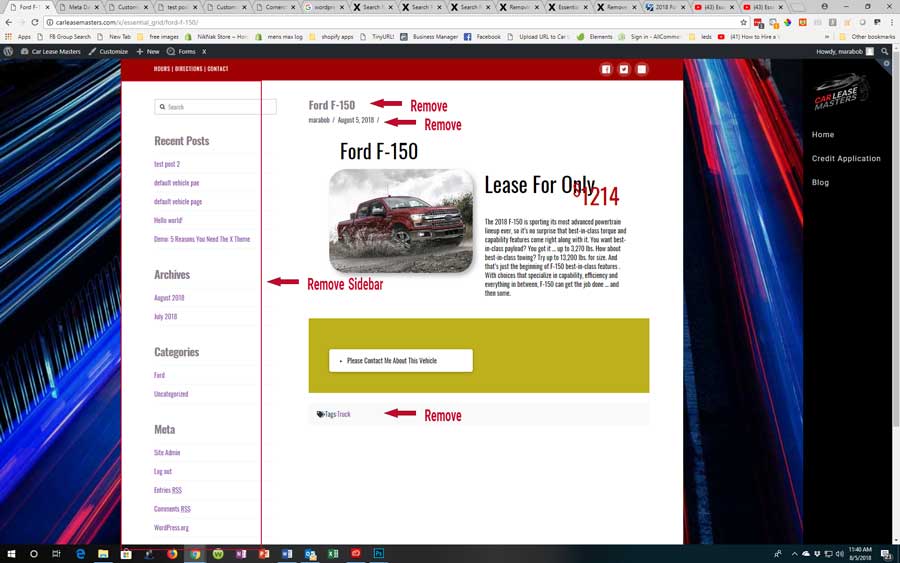
• The Sidebar
• The post title
• tags
• breadcrumbs
1st image is how essential grid post look like now
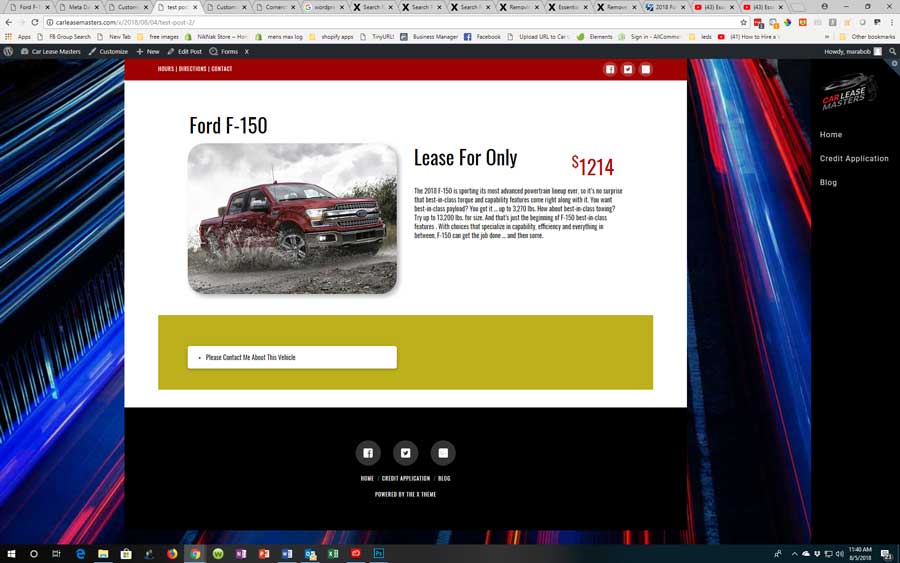
2nd image is how I would like it to look.
Thanks in advance
Hello There,

Thanks for writing in! The essential grid post item is dependent and will have the same layout as the post items. I have check your site and it seems that you already achieve what is in the screenshot 2. This is what I am seeing: http://prntscr.com/kf486a

Please apply the custom css you have to the essential grid posts as well. It is best that you add your custom css globally in X > Theme Options > Custom CSS.

Hope this helps.

I am still having a problem. Here is a link to a post made in essential listings.
http://carleasemasters.com/x/essential_grid/ford-f-150/

Here is a post made in wordpress
http://carleasemasters.com/x/2018/08/04/test-post-2/

Here is the global CSS

.single-post .has-post-thumbnail .entry-wrap {
padding-top: 0;
}

.single-post .entry-featured,
.single-post .entry-header {
display: none;
}
.x-header-landmark {
display: none;
}

.single-post .entry-footer {
display: none;
}

Hi Robert,

Could you please try adding the following CSS rules instead.

.single-essential_grid .x-sidebar {
    display: none;
}

.single-essential_grid .x-main {
    width: 100%;
}

.single-essential_grid .entry-header {
    display: none;
}

.single-essential_grid .entry-footer.cf {
    display: none;
}

Hope that helps.

Perfect. Thanks so much!

You are most welcome. :slight_smile:

This topic was automatically closed 10 days after the last reply. New replies are no longer allowed.