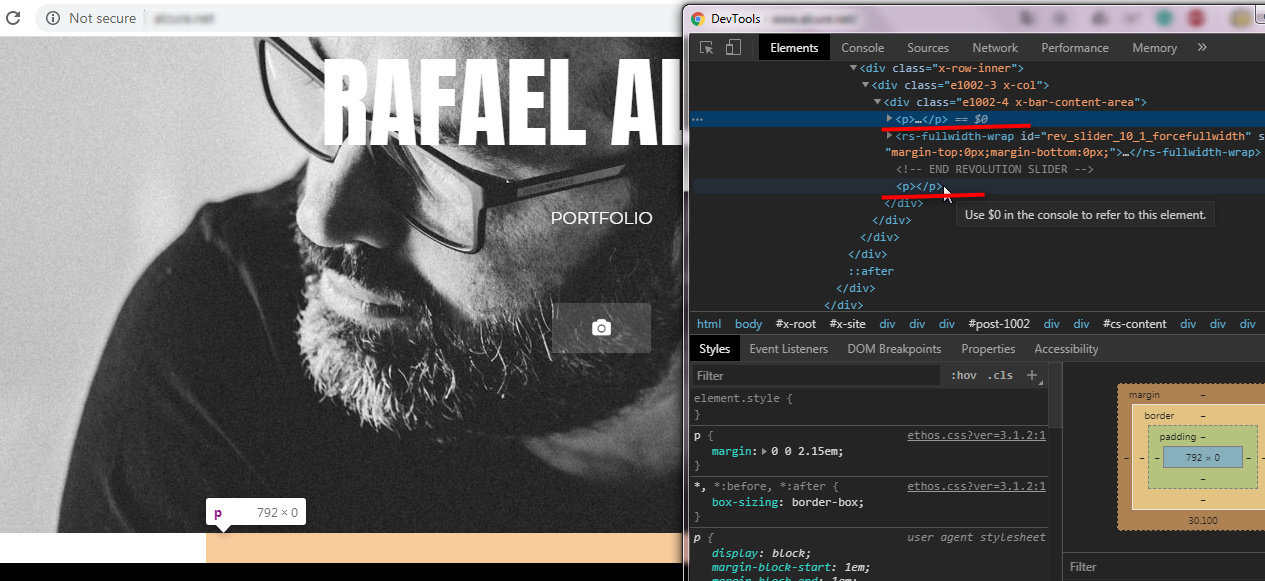
Remove margin/padding from header to content área

I’ve made a new page to just put a slider on it, but there was a huge gap between header and footer. So i went to inspect element to try to identify the right css for it. Before some trials and error, i’ve came with this CSS:
.x-container>.offset {
margin: 0;
}

The gap reduced alot, but still exists. I’ve tried inserting some random tags lag
height: 0;

or

padding-top: 0;
padding-bottom: 0;

but no success. The gap already exists in both top and bottom (before the footer).

Here’s what i’m trying to get rid of:

Hi Rafael,

Thank you for writing in, there are empty <p> tags above and below your slider that giving that space.


Actually the top <p> tag is not totally empty it has a comment on it.

<!-- START Alcurelandingpage REVOLUTION SLIDER 6.1.5 -->

Would you mind instead of adding the slider shortcode on Content Area element, please use the Classic Revolution Slider element for adding the slider? That way you can avoid the empty <p> tag issue, and any JS conflict that the slider preview might bring to the Content Builder.

Cheers!

This topic was automatically closed 10 days after the last reply. New replies are no longer allowed.