Possible to remove the left padding on the Tabs? Ideally for just the first tab label and first column of all tabs.
Hi @sc8tty,
For the Label, it is possible with custom CSS. As you can see on this screencast, we can target it directly using the following CSS. Inspect the element, then go to Customize tab > Element CSS, add the following:
$el.x-tabs ul li:first-of-type button {
    padding-left: 0;
}
For the tab panel content, though we can remove it using CSS too, it would be better to remove it via element settings under Panel tab:
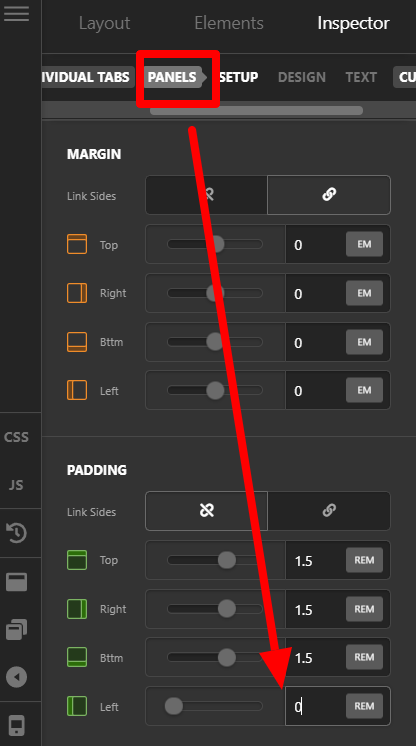
The following guide will help you for further CSS changes:
- Intro to CSS - https://goo.gl/mFuWQT
- How to get CSS selectors - https://goo.gl/BmoH39
- Get Started With Viewing And Changing CSS - https://goo.gl/7xFhDa
1 Like
This topic was automatically closed 10 days after the last reply. New replies are no longer allowed.