Good morning.
I have in my footer the word “Home” linked to my Home page. I’d like to remove it because my header bar is fixed, so it’s always possible return to my home page clicking on Home in my header bar menu.
In X them Option - Footer I have seen all my footer content, but there isn’t the word “home”, so I can’t remove it. Can you help me, please?
Then I’d like to reduce a little my footer, because I have just removed the Social bottom and I have noticed that the Footer didn’t reduce its dimension, but I hoped yes. I suppose that after removing also the word “Home”, my footer will appear bigger twice. Where I can reduce my footer if it wouldn’t reduce its dimension when I cancel words and frases in it?
Thank you so much.
Best regards
Hi There,
That’s the footer menu, to disable it please navigate to Theme Options > Footer > Footer Menu > switch to OFF:
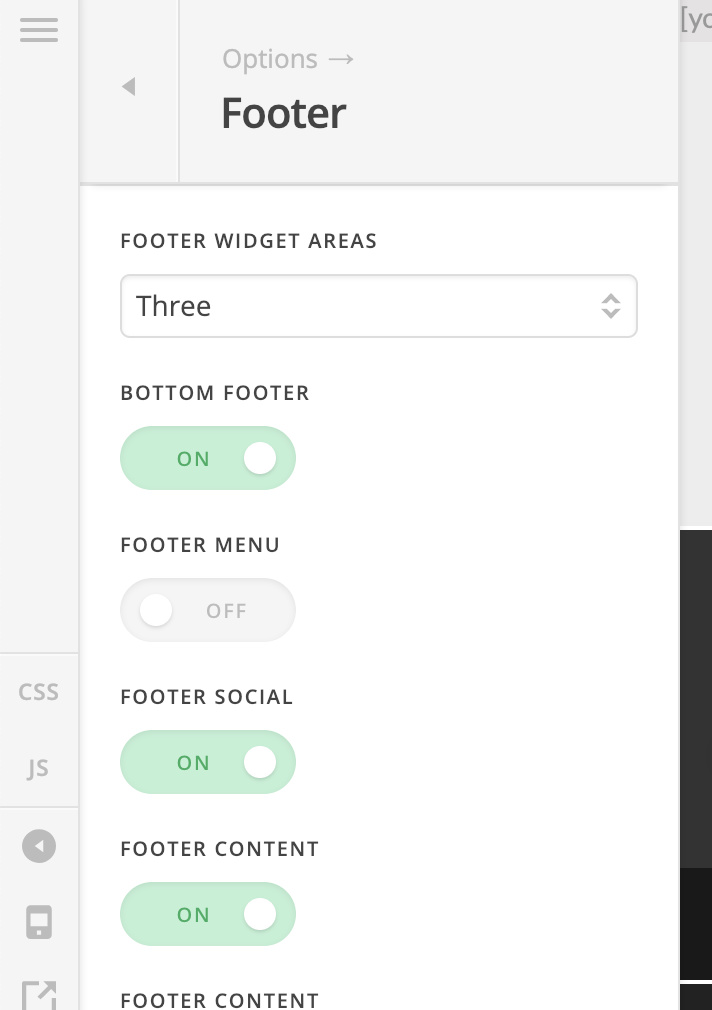
Hope it helps 
Thank you so much, Thai.
You are right. The preview in Theme option-Footer in this case doesn’t work (you can try), but after push on SAVE bottom… it’s ok: Home disappears.
Thank you again.
You’re most welcome!
This topic was automatically closed 10 days after the last reply. New replies are no longer allowed.