Remove container on Event Manager posts to make full width

Hi,

I’m using Events Manager Pro for the events on my X website. Events Manager Pro uses posts to format events, but it has no Cornerstone functionality.

To get around this limitation I use Global Blocks to create my events, and simply insert the shortcode in the Event post. This works well, but I’d like to make some individual events full width.

How can I remove the container on these event posts so that the content created in Global Blocks will display full width? I’ve tried using some modified custom css for full width posts found here on the forum, but it doesn’t work.

Here’s an example of one of my events:

https://www.andrewcohen.com/events/intersubjective-nonduality-8-part-course-2019-12-10/

Many thanks for any help that can be offered!
Hi Michael,

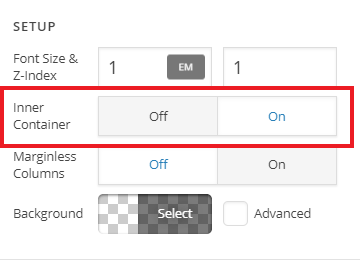
Thank you for reaching out to us. In your Global blocks, you can turn off the Row’s Inner Container:

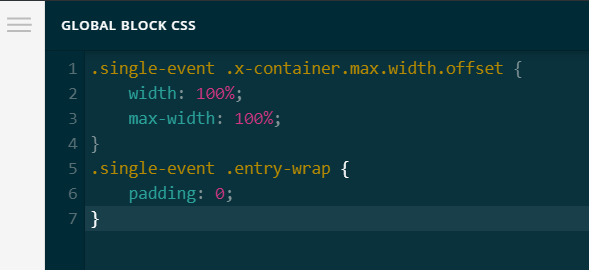
Then you can add the following code in your Global Block’s CSS section

.single-event .x-container.max.width.offset {
    width: 100%;
    max-width: 100%;
}
.single-event .entry-wrap {
    padding: 0;
}

Hope this helps!

Hi @Nabeel

Thanks, that’s almost there!

How do I get the address, map and booking form to align correctly with the content above it? I tried some css which is only partially successful (works only at certain widths):


.single-event .event-location-map {
  padding: 20px 5%;
}
.single-event #booking-section {
  padding: 20px 5%;
}
.single-event .em-address {
  padding: 20px 5%;
}

Thanks again for your help.

Hi Michael,

Instead of using those codes, please try:


.single-event #booking-section, 
.single-event .event-location-map, 
.single-event .em-address, 
.single-event .em-booking {
    max-width: 1200px;
    width: 90%;
    margin: 0 auto;
}

Hope this helps.

@Jade

Thank you!

You’re welcome, Michael.

This topic was automatically closed 10 days after the last reply. New replies are no longer allowed.