Remove bottom margin from Envira Gallery within Pro

Hello,

I am trying to get rid of the bottom margin on Envira Gallery. I was able to remove it within the browser but the CSS won’t work when added to Pro.

.envira-gallery-wrap .envira-album-public, .envira-gallery-wrap .envira-gallery-public {
    margin: 0 auto 0 auto !important;
}

Development Website

It’s the “EAT.STAY.PLAY” section.

As you can see from the image, you don’t see any space within Pro, only on the live website.
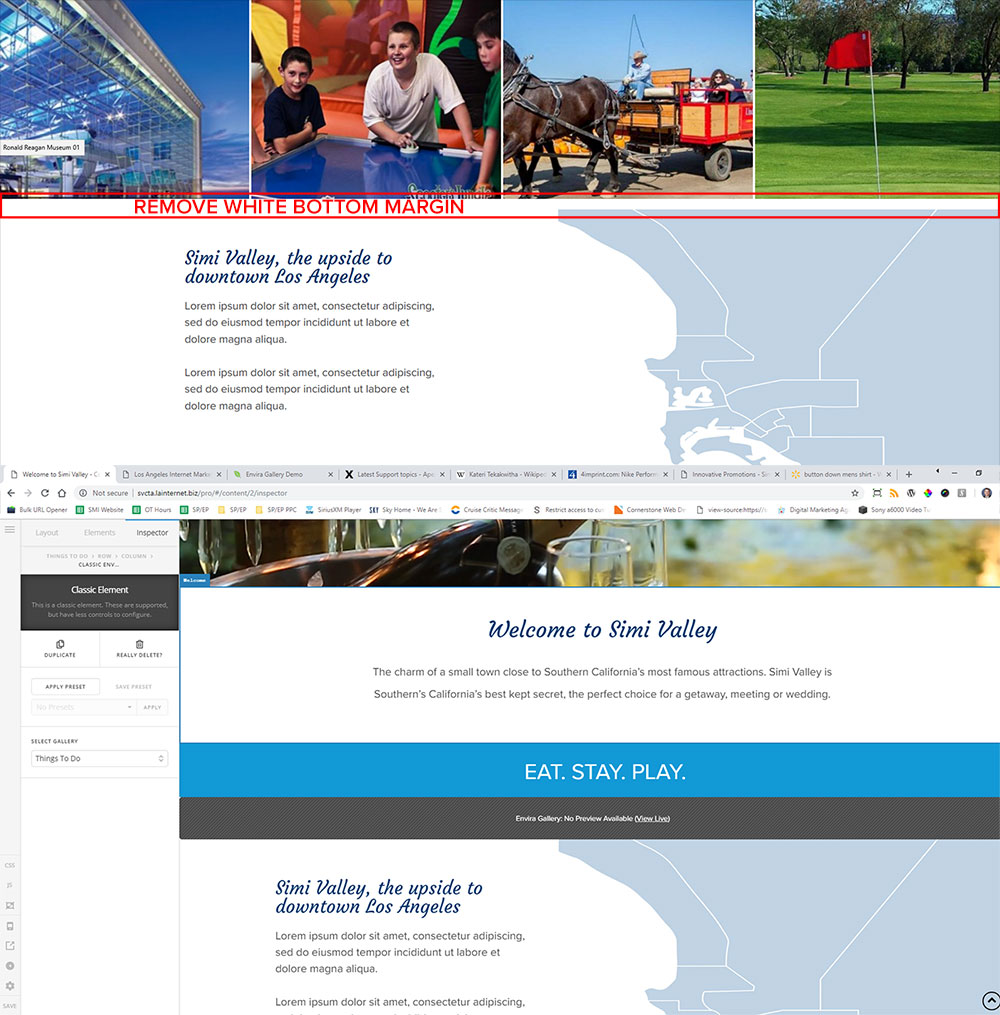
Thanks for the help.

Micah

Hi There,

Thanks for writing on!

Can you please try this CSS instaed of yours.

.envira-gallery-wrap {
margin: 0px auto !important;
}

Hope this helps!

I added the code and it did not remove the bottom spacing.

Micah

Hello Micah,

Thanks for updating the thread.

Please replace the previous code with following:

.envira-gallery-wrap .envira-album-public.envira-clear, .envira-gallery-wrap .envira-gallery-public.envira-clear {
    margin-bottom: 0 !important;
}

1- I have found the proper CSS code selector using the Chrome browser Developer Toolbar: https://www.youtube.com/watch?v=wcFnnxfA70g

2- For the CSS code itself, I suggest that you get started with this tutorial: https://www.youtube.com/watch?v=yfoY53QXEnI

Thanks.

Hello Prasant,

I am very experienced with HTML, CSS, and Developer Tools and have no problem fixing this in the browser as I originally stated in my source post. I can fix it in Chrome, Edge, FF, and even IE!

Even though I can fix it in the Dev Tools, nothing I have added to the CSS actually works on the live website. I have tried a bunch of different code.

Now, back to your code. It did not work once implemented in the Pro Builder CSS tab.

Since I have provided access to the site, please actually login and test your code before you send a 3’d fix to ensure that we can remedy this issue and close this ticket.

Thanks,

Micah

Hello There,

I have logged in to your site and edited your homepage. I added the css code given by @Basanta.

It is now working. Please check your site now.

As it turns out, it required both of these CSS statements for it to actually work. Either statement on it’s own has no effect.

.envira-gallery-wrap .envira-album-public.envira-clear, .envira-gallery-wrap .envira-gallery-public.envira-clear {
margin-bottom: 0 !important;
}

.envira-gallery-wrap {
	margin: 0px auto !important;
}

Micah

Glad you’ve sorted it out and thank you for sharing the solution here.

Cheers!

This topic was automatically closed 10 days after the last reply. New replies are no longer allowed.