Related Posts in Cornerstone or The Grid

Hii! Please

I’m working with Cornerstone and The Grid (:sparkling_heart:amazing)

I don’t understand one thing, why at the end of some posts a list of related posts is created (images with a filter) and not in others? I’m interested in appearing in everyone.

IN THESE POSTS the “Related” Posts APPEARS:

https://www.angelicamonge.com/2017/02/03/appears-without-legs-wooden-piece/
https://www.angelicamonge.com/2011/04/27/to-draw-for-the-animal/
https://www.angelicamonge.com/2010/11/26/battleship-game/
https://www.angelicamonge.com/2007/11/11/couples-and-things/

IN THE OTHERS NO:

https://www.angelicamonge.com/2012/07/29/queen-isabel-speech/
…

It has no relationship between parents and children … don´t know …

Thank you
Hi There,

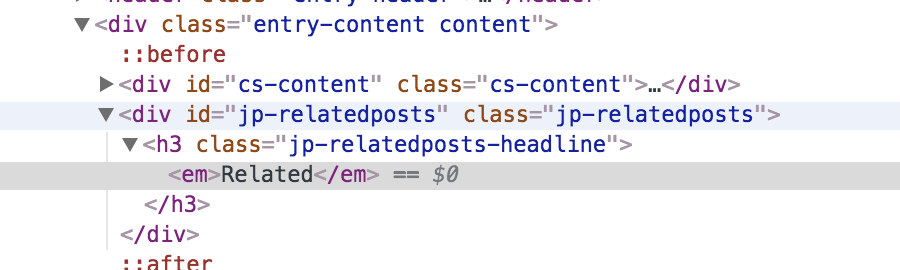
Upon checking that post, I could see that the HTML code of the related posts but there are no posts show.

Could you please double check on that post has a related post or not?

Thanks.

1 Like

Thank you @thai
but I don’t understand. I have it activated in Cornerstone. In the preview of Cornerstone appears in all posts. But in the browsers only in some of them.

Hi @angelicamonge,

Thanks for updating us.

I could see a lot of problem in your setup in the browser console. Would you mind testing for plugin conflict.

You can do this by deactivating all third party plugins, and seeing if the problem remains. If it’s fixed, you’ll know a plugin caused the problem, and you can narrow down which one by reactivating them one at a time.

Let us know how it goes!

Thanks.

1 Like

Hello
Thank you very much @nico,

You see, a friend programmer recommended me some of the plugins that I have installed. But he, obviously, didn’t know X-Theme.
I need to know, please, what plugins I don’t need. What functions/works does X-Theme cover in order to uninstall the plugins that I have. (For example: If X-Theme has CSS/Javascript/html Minify, can I uninstall Autoptimize?. Or if X-Theme resizes and optimizes the images, I can remove Imsanity, etc)

Thank you

Hi There,

I was wondering how the Jetpack Related Posts determined the related articles and I found this (see the General Information section), does that conditions meet by your post?

Those plugins you mentioned above are good, the thing is X-Theme CSS and JS resources are already minified. Autoptimize cache its minified files, just like other caching plugins you might encounter issues when there is changes/updates on the site but the site still serving you the outdated cached resources. That is why we always advise clearing the caching after the site update.

Hope this shed some lights,
Cheers!

This topic was automatically closed 10 days after the last reply. New replies are no longer allowed.