Hello!
How do I reduce the space above the title (About) on my About page (I don’t see any padding controls for the Section)? And, what H tag is the title?
TIA
Hello!
How do I reduce the space above the title (About) on my About page (I don’t see any padding controls for the Section)? And, what H tag is the title?
TIA
Hello Marshall,
Thanks for writing in!
The default page template has a padding of 60 pixels.
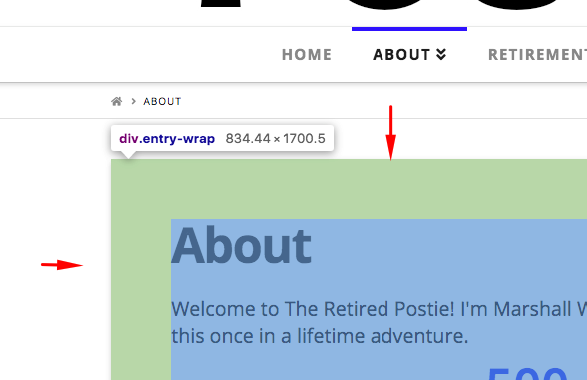
If you want to override the paddings, please add the following CSS code in the X > Theme Options > Global CSS (http://prntscr.com/evui3r)
.page .entry-wrap {
  padding-top: 30px;
  padding-bottom: 30px;
}
Feel free to adjust the value to the most appropriate spacing you need.
Thanks for the assistance!
You’re most welcome!
This topic was automatically closed 10 days after the last reply. New replies are no longer allowed.