Reduce content width

Hello-

I would like to reduce the width of the content section only for all pages. I don’t want it to change the header or footer width and I also want to still be able to do this without containers so I can have full width sections on pages using cornerstone.

SO for this page for example: https://alisonljames.com/about/

Where the content is I would like a width of 900px.

Look forward to your response.
Kim
Hello Kim,

Thanks for writing in!

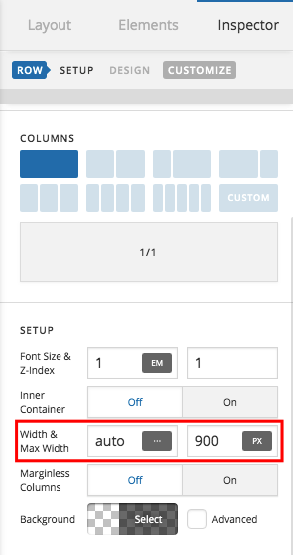
To achieve what you have in mind, simply edit your page back in Cornerstone and in Section > Row Settings do the following:

  • Turn OFF the Inner Container
  • Set the width to auto
  • Add a maximum width of 900 px.

We would love to know if this has worked for you. Thank you.

Hello-
I want this for the whole website. I don’t want to have to do it row by row.

Thank you.

Hello Kim,

If that is the case, please add the following CSS code in the X > Theme Options > Global CSS (http://prntscr.com/evui3r)

.page .entry-content.content .x-section > .x-container {
    max-width: 900px;
}

We would love to know if this has worked for you. Thank you.

This topic was automatically closed 10 days after the last reply. New replies are no longer allowed.