This seems to only be doing it on one phone, but can’t figure out why that is. On Samsung Galaxy S10
We can’t figure out what is doing this, as there is on CSS we added
Do you mind having a look please
This seems to only be doing it on one phone, but can’t figure out why that is. On Samsung Galaxy S10
We can’t figure out what is doing this, as there is on CSS we added
Do you mind having a look please
Hi @Stigan,
Thanks for reaching out!
I check your website on my actual mobile phone but I can’t replicate the issue on my end. I suggest that you clear your browser cache on your Samsung Galaxy s10 device.
On the other hand, if the issue still persists, I suggest that we will add !important to the background of that specific section. To do that, go to that specific section then click the customize tab and click the edit CSS.
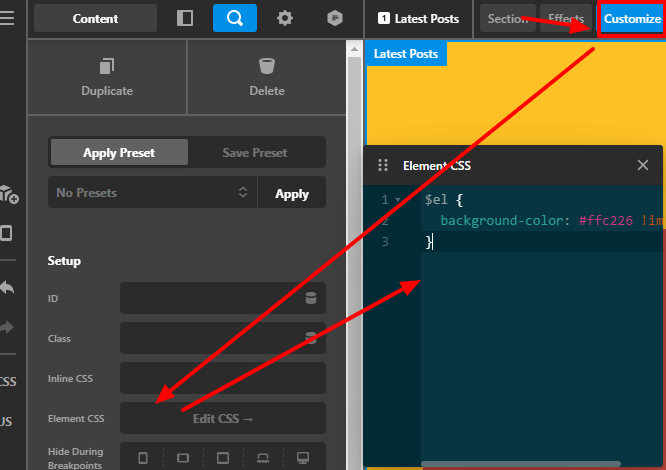
Then add this code in the element CSS:
$el {
	background-color: #ffc226 !important;
}
In that way, we force that section to have yellow color background.
Hope that helps.
Thank you.
This topic was automatically closed 10 days after the last reply. New replies are no longer allowed.
