Recreating the bullets on integrity 1 home page, images cover bullets

Hello!

We are recreating the bullets that are inbetween photos on the integrity 1 home page. We created custom bullets using the existing ones then uploaded them, for some reason they show behind or covered by the images, the images are the correct size based on the template. I tried making them smaller that did not help.
We are rebuilding this a replica of this site, on the prior one this was a problem as well, Support when in and did something to correct it. We are not sure what that was.

original site www.robgrayconstruction.com
rebuild sub site 2017rgc.robgrayconstruction.com
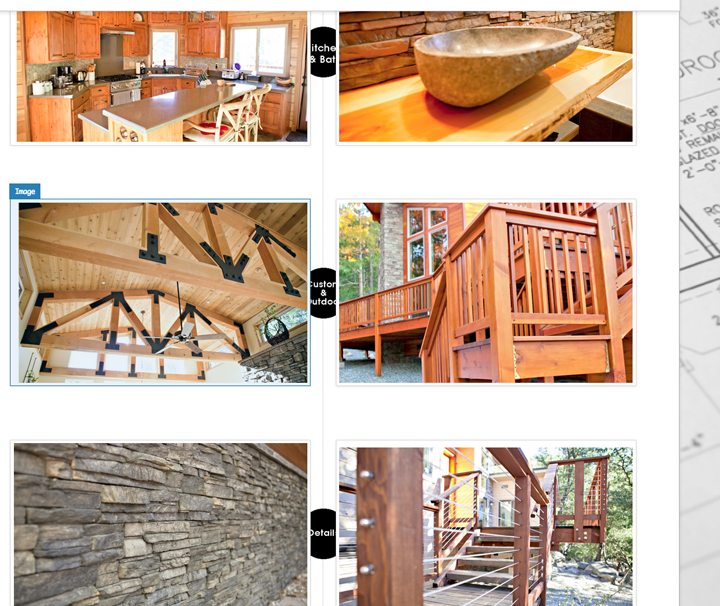
For that specific effect, they simply added padding to the columns. Right padding in the first column, left padding in the next. integrity uses 7%. You can try that, or go with a constant 50px since you hide the section on mobile anyways.

HI!
THANK YOU!

I will try that.

However, I didn’t want to hide this section on mobile.

I had just found out that I have to build a different site for mobile today, I thought when I build for desktop that the site was automatically mobile??? ;o(

No, you got the wrong impression. Your first thought is actually the right one when building the site your content would be for desktop and mobile, because those content/elements are responsive. Meaning they can adopt to the width of its container.

But there are some cases (like what you’re dealing now) where the desktop layout looks mess up on mobile. This is where the Hide Base of Screen Width feature comes in, where you hide one section/row base on the screen width.

This is how those desktop section looks like when you let them be visible on mobile:

screenshot

We could actually fix that with custom CSS, but we recommend to utilize the Hide Base of Screen Width feature on this cases.

How “Hide Base on Screen Width” feature works.

Hope this shed some lights,
Cheers!

This topic was automatically closed 10 days after the last reply. New replies are no longer allowed.