Recent Posts - description font size

I want to show more of the post titles on the homepage for publications and recent new but not effect the styling of any that shows the titles. Only the homepage section. Please see screenshot. For example whenever I change the font size in the CSS it effects the other page stlying too.

http://allcareptc.staging.wpengine.com/
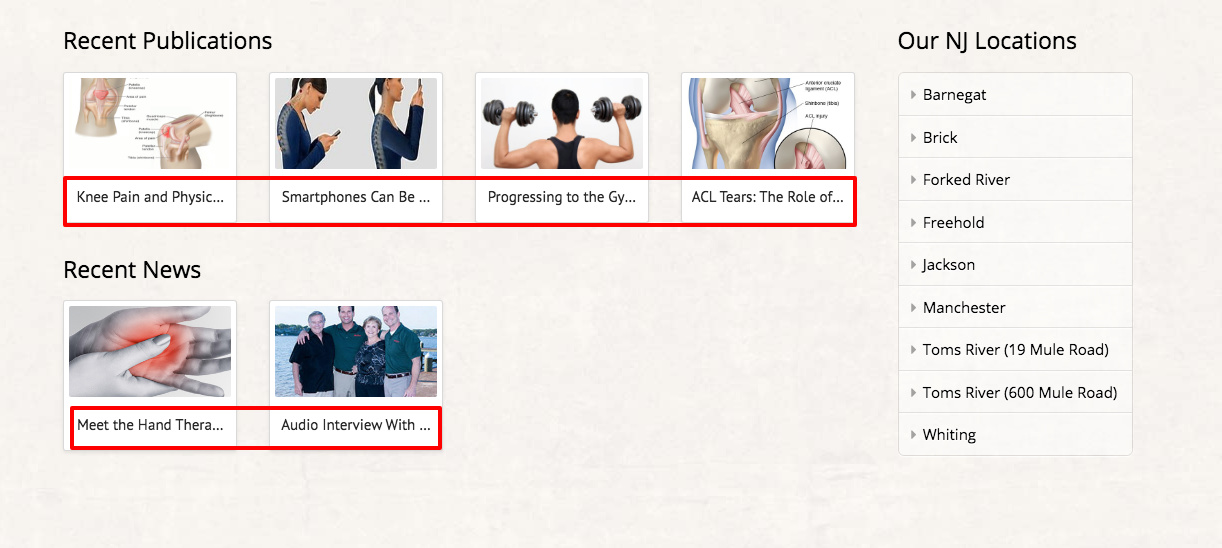
Hi there,

You already have the code that targets the recent post title and it seems to work fine:

.x-recent-posts .h-recent-posts {
    margin: 7px 0 5px;
    text-align: center;
    font-size: 15px!important;
    line-height: 1.2;
    transition: color 0.3s ease;
}

If you want to display all of the title, please update the code to:

.x-recent-posts .h-recent-posts {
    margin: 7px 0 5px;
    font-size: 15px!important;
    line-height: 1.2;
    transition: color 0.3s ease;
    background-color: white;
    text-overflow: unset;
    overflow: visible;
    white-space: inherit;
    text-align: left;
}

Hope this helps.

But this will effect all other pages. I am just referring to the homepage area marked in the screenshots.

Hello @lacorte,

Thanks for updating the thread. :slight_smile:

Please replace the code with following:

body.home  .x-recent-posts .h-recent-posts {
    margin: 7px 0 5px;
    font-size: 15px!important;
    line-height: 1.2;
    transition: color 0.3s ease;
    background-color: white;
    text-overflow: unset;
    overflow: visible;
    white-space: inherit;
    text-align: left;
}

If you would like to learn CSS, I am sharing few resources that you take a look to get started with CSS and an interesting tool that you can use to speed up the development process.

I recommend you to watch following video that will help you to get started with CSS.

https://www.youtube.com/watch?v=MFR4WXiLzpc

Sometimes it can get a bit difficult to find out the right selector to be able to write the required CSS codes. A handy tool that can help you in this is Google Chrome dev tools. I am sharing the resource that you can refer to get started with dev tools.

https://developers.google.com/web/tools/chrome-devtools/css/

https://developers.google.com/web/tools/chrome-devtools/

https://www.youtube.com/watch?v=tP_kXBJWPhQ&t=200s

Thanks.

This topic was automatically closed 10 days after the last reply. New replies are no longer allowed.