Raw Code Elements and others not functioning correctly

I am having issues with placing certain elements in the new updated X Pro, specifically the Raw Code or Classic Raw Code (and others too, like the classic line and line won’t display). When it’s placed, sometimes I can see it (on the editing side) and sometimes I can’t. Also, I have embedded code that will not load in some browsers and will not load on my iPhone when I visit the website. I don’t know if this is just a isolated website issue or if it is an issue across the entire X Pro upgrade.

For example, I’ve placed two classic accordions with embedded code inside of each and it displays on the Firefox Browser on a PC, but does not display on the Firefox Browser on a Mac. It also does not display on the browsers on my smart device (iPhone). What’s going on with this? I need to send out a form and it does not display on every device and on every browser.

Hey @thatcreativeguy,

There’s currently a problem with inserting <script></script> tags in the Classic elements.

I tested the non-classic Accordion element on a test page and it works. Please use the Accordion element for now.

Thanks.

Thanks. Will do!

Hi @thatcreativeguy,

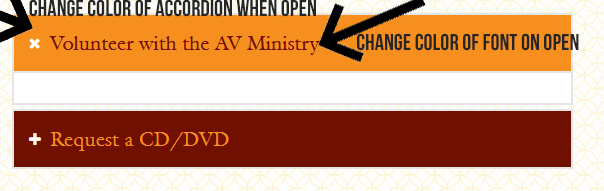
You’re welcome. On the other hand, I am not quite sure which part of the accordion would you like to change the color, can you please point it out. Providing screenshots is a big help.

Thank you.

Accordion_1_Screenshot Accordion_2_Screenshot

Screenshots are attached. I hope this helps. This is NOT for the classic accordion. It’s for the accordion you recommended to show embedded code. Thanks!

Hello @thatcreativeguy,

To change the colour font, background-colour and icon colour of accordion please add this custom CSS code under X—>Theme Option—> CSS.

/* Icon color chnage */
.x-acc-item button.x-acc-header span.x-acc-header-indicator {
    color: #fff !important;  
}
/* Accrdion background color and font color chnage */
.x-acc-item button.x-acc-header {
    background-color: rgb(201 0 68) !important;
    color: #ffffff !important;
}

/* On Active Accrdion background color and font color chnage*/
.x-acc-item button.x-acc-header.x-active{
	background-color: rgb(77 58 64) !important;
	color:#FFEB3B !important;
}
/* On Active Icon color chnage */
.x-acc-item button.x-acc-header.x-active span.x-acc-header-indicator {
    color:#FFEB3B !important;
} 

The purpose of providing the custom CSS to show you how to add CSS code to your site. Writing custom CSS is outside the scope of our theme support. If you need more customization, you need to learn CSS and learn how to use the browser’s element inspector.

Hope it helps you.
Thanks

Thanks for much for your help! Yea, I do use the browser’s element inspector. Thanks again!

Hi @thatcreativeguy,

You’re welcome and it’s our pleasure to help you. If you have any other concerns regarding our theme features, feel free to reach us.

Thank you.

This topic was automatically closed 10 days after the last reply. New replies are no longer allowed.