Question about Gym theme

Hello on the Gym theme in Design cloud, there are these “flip cards” right:

What would the best practise for doing things like swapping those icons, or changing them into other “default” X icons (I can see how to add a custom image, but I’m trying to use the prebuilt ones in a more custom ordered way).

So for example let’s say I wanted the Flexibile Timing one to have the chat bubble icon on it. Or wanted something else entirely from the premade X icons?

Hello Jasdeep,

Thanks for writing to us.

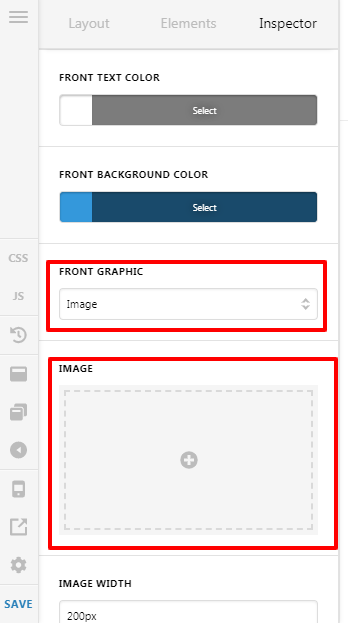
You can change the icon or you can add an image in place of the icon. For that, you need to go to the setting of the “Classic Card” Element.

If you set the “Front Graphic” as Icon then you would get an option to chose the icons.

Please have a look at the screenshot below.

If you set the “Front Graphic” as Image then you would get an option to set image.

Thanks

I can’t find that exact options panel for the icons, I’m clicking on Inspector on the card on the Gym theme and looking at all the options. Could you show a gif please?

Ok I found it, it looks very different on cornerstone for me, it’s the “primary icon” section.

Hi Jasdeep,

We are glad that you are able to find the options. If you have any other concerns, just let us know.

Thank you.

This topic was automatically closed 10 days after the last reply. New replies are no longer allowed.