Put comments inside content-box

Hi there,

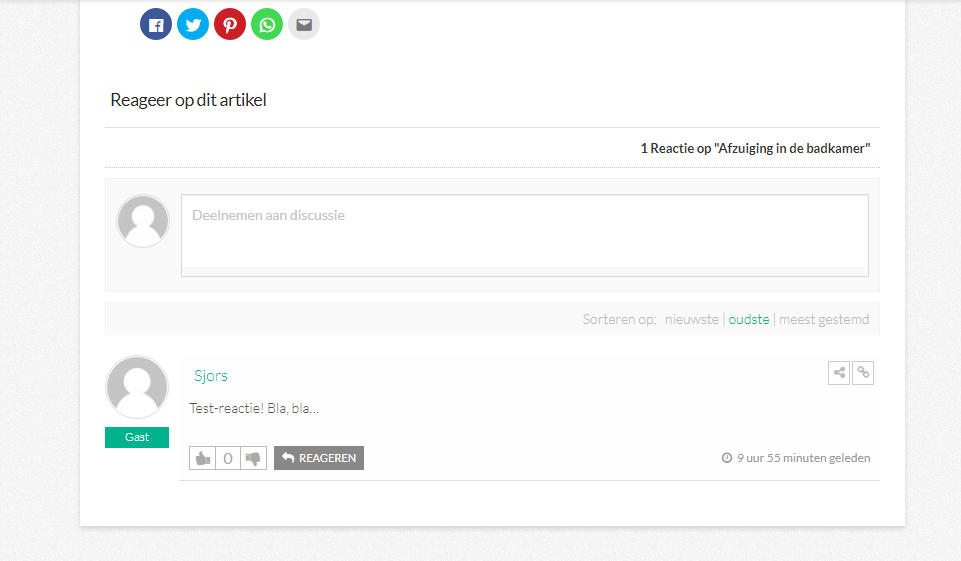
Today I activated the comments on pages. Unfortunately, they appear outside of the ‘box’ where my content is. How do I achieve the options below? (I’m not sure yet which one looks the best.)

  1. Add the comments below the share buttons INSIDE the text box.
  2. Add a new box around the comments-section, with a little bit of blank space between the comments box and text box.

A preview of the comments as they are right now can be found on: https://huisa.nl/badkamer/afzuiging-badkamer/

Thank you in advance!
Sjors
Hey @sjorsferwerda,

Add this following CSS code snippet to X >> Launch >> Options >> CSS to get the design shown in screenshot.

.comments-area {
     padding: 0px 25px;
     margin-top: -2px;
     box-shadow: 0 0.15em 0.35em 0 rgba(0,0,0,0.135);
     background: white;
} 
.entry-wrap {
     padding-bottom: 10px;
}

Screenshot :

Provide screenshot if you want to make some changes to desired result.

Regards

Thank you for your quick reply, @rahul. It looks exactly as I wanted now :slight_smile:

Really glad that I could be of help! :slight_smile:

Cheers!

This topic was automatically closed 10 days after the last reply. New replies are no longer allowed.