Hey there,
I would like to have two (block) buttons side by side in the middle of my homepage. I created 4 columns and the distance between the two buttons is 9mm.
How do I pull them closer together (to 6mm) without messing up the mobile versions?
Hey there,
I would like to have two (block) buttons side by side in the middle of my homepage. I created 4 columns and the distance between the two buttons is 9mm.
How do I pull them closer together (to 6mm) without messing up the mobile versions?
Hi There,
The other solution is add 2 buttons into the the 1 column after that set the left & right margin:
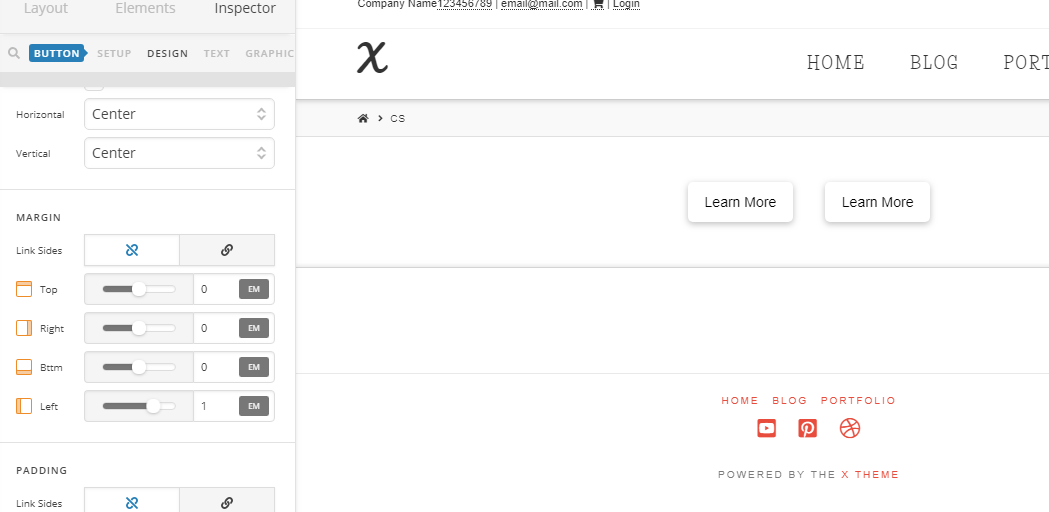
Hope it helps 
I already tried that configuration but it destroys the mobile version because it places both buttons side by side. I want them to be closer together in the desktop version and on top of each other in the mobile version.
Hey @instisc,
@thai’s suggestion is correct. You just only need to adjust the Column’s Right and Left Paddings so it will constrict the buttons and make them stack on mobile. It’s also best that you set a fixed width for the buttons. You can see a demo at https://youtu.be/l-d1O5fdVA8
You’re currently using columns to achieve the layout. However, there’s no option to modify the column spacing. That will need custom development which is outside the scope of our support.
Hope that helps.
Wow, the video is awesome! It answers every question!
Thank you very much!
Glad to hear that.
This topic was automatically closed 10 days after the last reply. New replies are no longer allowed.