Hello Staff,
I want to change the presentation of my products. Currently it is like this:

… but I want it to look like this:

It’s possible?
Thanks
Hello Staff,
I want to change the presentation of my products. Currently it is like this:
… but I want it to look like this:
It’s possible?
Thanks
Hello There,
Thanks for writing in! To resolve your issue, please add the following CSS code in the X > Launch > Theme Options > Global CSS (http://prntscr.com/evui3r)
.woocommerce li.product .entry-wrap {
    position: relative;
}

.woocommerce li.product .entry-wrap:before {
    display: none;
}

.woocommerce li.product .entry-header h3,
.woocommerce li.product .entry-header h3 a,
.woocommerce li.product .entry-header .price>.amount,
.woocommerce li.product .entry-header .price>ins>.amount {
    color: #000;
}
Hope this helps. Please let us know how it goes.
Hello,
Thank you very much,
I added the code, but the “Related Products” looks like this:
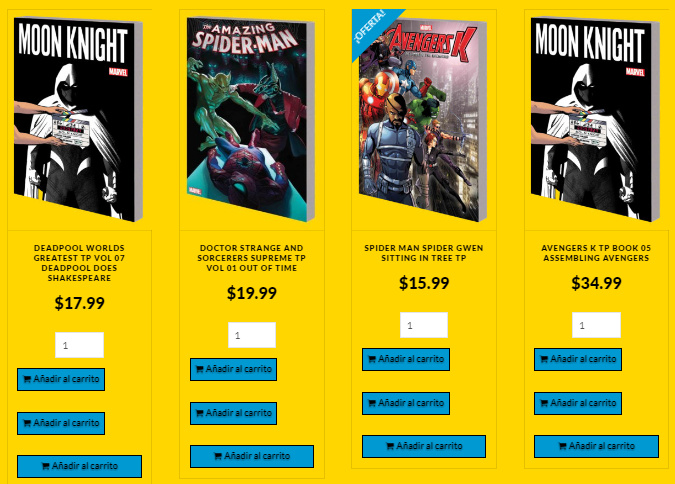
Please help me,
Thanks
I realize they’re not identical, but could you please clarify on the differences you’re looking for? We can try to help, but as this is starting to get into custom development, we may be limited on the assistance we can offer within the scope of support.
Hello,
I only change the background and the white-space: normal. The code complete is:
.woocommerce li.product .entry-wrap {
position: relative;
}
.woocommerce li.product .entry-wrap:before {
display: none;
}
But the button “Add to cart” see 3 in triplicate in “Related products”, only with the code that support has provided.
Thanks
Hi there,
I did not understand exactly what you mean but I guess you meant the color of the blue buttons. YOu need to add this to your CSS code:
.woocommerce li.product .entry-header .button {color: white;}
The reason the Add to Cart is in 2 rows because there is not enough space for the words. The example above you mentioned had 5 items in a full-width mode. But the Related Product section has a sidebar which makes smaller space for the text.
Thank you.
Hello Staff,
I solved my problem. The “Add to cart” button was tripled by a JS code, I deleted it and it works fine.
Now I have another question. How can I make the price on sale visible?
Actually:

But I Want:

Thanks
Hi there,
Please add this CSS as well,
.woocommerce li.product .entry-header .price>del {
    display: inline;
}
Thanks!