Product Page Background Color

Hi,

I am using Pro Layouts to customise the layout of Single Product pages. I have found a difference between one set of products and the rest. One set under the menu iSleepStore > Sleep Downloads > has a deep blue outer background for the product.

However, if you go to any other product in different categories, e.g. iSleepStore > Free Downloads > , the outer background is white.

I would like to have the blue background for all product backgrounds. Details of the layouts are in the Secure Note.

The Pro > Theme options > Layout Background Color is set to #001547. I would have thought that this is what is showing in the Sleep Products backgrounds, but don’t understand why it is not showing for the other products?

Are you able to help identify why the background colour is #001547 on just the Sleep Products and how can I make it be the same for all other products? The two screenshots show the difference.

Many thanks,
Christopher

Hello Christopher,

Thanks for writing to us.

I checked both the pages’ URLs it seems that one of the product pages is rendering from the single page layout builder but the other one is not rendering from the builder.

iSleepStore > Free Downloads > These category products are rending from the Single Product layout.

To make it similar to the default design

main.x-layout.x-layout-single .entry-wrap {
    background: transparent;
}

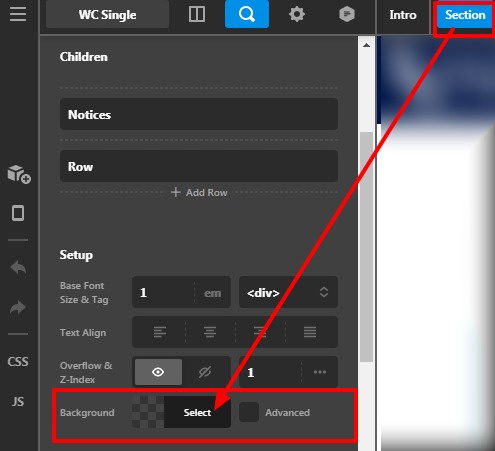
Go to the Layout builder —> Section —>Click on the Magnifier icon—>Set the background color from here.

Product-Single-Free-Downloads-Layouts-Pro

SleepStore > Sleep Downloads >These category products are not rending from the Single Product layout. It is rendering the default single-page layout.

The purpose of providing the custom CSS to show you how to add CSS code to your site. Writing custom CSS is outside the scope of our theme support. If you need more customization, you need to learn CSS and learn how to use the browser’s element inspector.

Hope it helps.
Thanks

Hi Prakash,

Thanks for the answer, but it is a little confusing. Sleep Downloads is definitely not rending from a single-page layout. The product has been created using WP default product page and no Pro builders.

In fact, the “Sleep Downloads” Single Layout was the first one I created. I duplicated it for “Free Downloads” and the others, but modified the product category for it to be allocated to.

What I am trying to achieve is that the content is all on a white background, but the outer area is blue, as in the below screenshot. Please note that the blue outer area cannot be seen in the Pro Layout builder preview. It is only visible on the live page.

Thanks again,
Christopher

Hello @whitemedia,

I checked your layout builder settings it seems that you added the custom CSS but you have not set the section background color that I have mentioned and the back-end outer background color is blue.

In case if you don’t want to set the background color of the section you can achieve it through custom CSS.

main.x-layout.x-layout-single .entry-content {
    background: #ffffff;
    border-radius: 10px;
}

After adding this CSS the output would be like this.

Backend mode

Live mode

The purpose of providing the custom CSS to show you how to add CSS code to your site. Writing custom CSS is outside the scope of our theme support. If you need more customization, you need to learn CSS and learn how to use the browser’s element inspector.

Hope it helps.
Thanks

Thanks for all your help Prakash!

Hi White,

You’re welcome and we’re glad that my colleague Prakash able to help you with your issues! If you have any other concerns or clarifications regarding our theme features, feel free to open up a new thread.

Thank you.

This topic was automatically closed 10 days after the last reply. New replies are no longer allowed.