Hey @odsadmin,
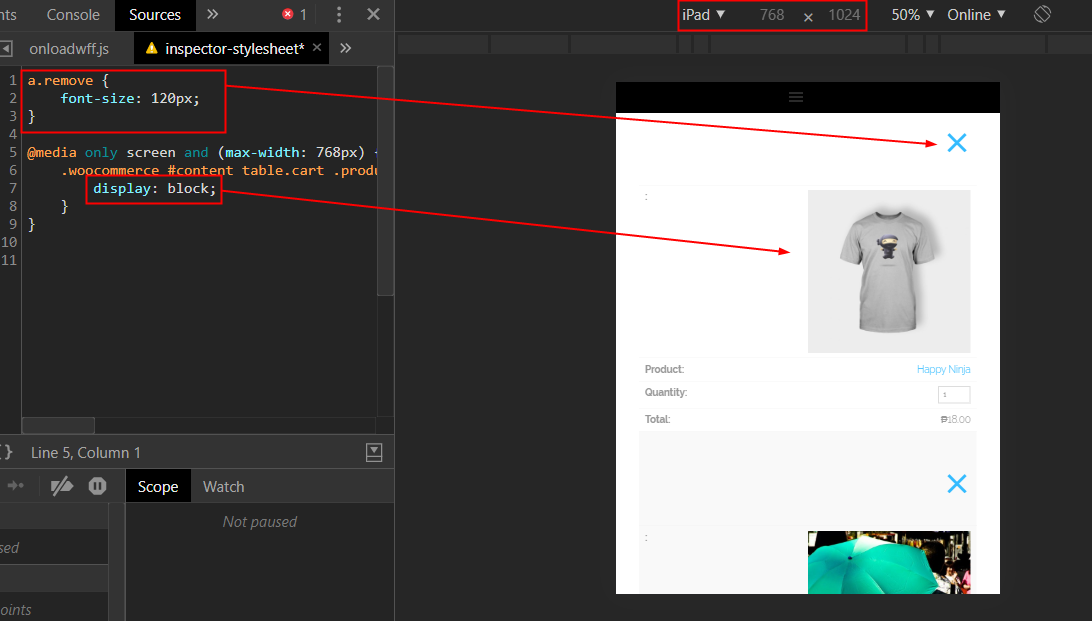
The code posted by Ruenel will not show the pic on iPad. The first part though should make the X or close icon bigger.
Before I give you the correct code to show the image on iPad, please note that our theme does not override those parts of WooCommerce therefore this issue is coming from WooCommerce itself and not our theme. With that said, after I give you the sample code, you will need to hire a WooCommerce developer to customize those parts further.
Here’s the sample code that should be added in X > Theme Options > CSS.
a.remove {
    font-size: 120px;
}

@media only screen and (max-width: 768px) {
    .woocommerce #content table.cart .product-thumbnail, .woocommerce table.cart .product-thumbnail, .woocommerce-page #content table.cart .product-thumbnail, .woocommerce-page table.cart .product-thumbnail {
        display: block;
    }
}
The code guaranteed to work provided that you don’t have syntax errors in all your current CSS.
If the code doesn’t work on your end, please consult with a third-party developer to check your site for syntax errors.
Hope that helps.
