I was a bit surprised that there wasn’t a preset WooCommerce Breadcrumb for product category. I searched the forums and couldn’t find one, so I generated one… and wanted to share with the community to simplify this for others.
This snippet registers a Cornerstone Looper Provider that finds the deepest product category assigned to the current product, walks up its parent categories, and returns the trail from Shop → category ancestors → product. If there are multiple deepest categories, it uses the first one returned by WordPress.
Use this in combination with Pro’s native element: Breadcrumbs (Elements)
In Cornerstone, set Looper Provider → Product Category Breadcrumb on the breadcrumb wrapper and Looper Consumer → All on the repeating crumb. Since each item is an array with name and url fields, use:
- Crumb label:
{{dc:looper:field key="name"}} - Crumb link:
{{dc:looper:field key="url"}}
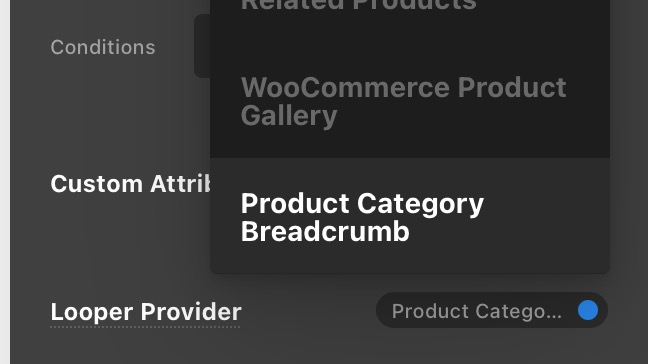

If you’re not looking for the Shop Name as the first item or the product name as the last item, add a Condition to the Crumb.
Either:
- Index is not First
or - Index is not Last
or - Index is not First and
Index is not Last

/**
 * Register a Cornerstone looper for a product breadcrumb:
 * Shop > category ancestors > product.
 * If multiple deepest categories are assigned, the first one returned by
 * WordPress is used.
 */
function register_product_category_breadcrumb_looper() {
	if ( ! function_exists( 'cs_looper_provider_register' ) ) {
		return;
	}

	cs_looper_provider_register( 'product-category-breadcrumb', array(
		'label'  => __( 'Product Category Breadcrumb', 'pro-child' ),
		'values' => array(),
		'filter' => function( $results, $args = array() ) {
			$product_id = get_queried_object_id();
			$product    = $product_id ? wc_get_product( $product_id ) : false;

			if ( ! $product ) {
				return array();
			}

			$terms = get_the_terms( $product_id, 'product_cat' );

			$deepest_term = null;
			$deepest_path = array();

			if ( ! empty( $terms ) && ! is_wp_error( $terms ) ) {
				foreach ( $terms as $term ) {
					$ancestor_ids = get_ancestors(
						$term->term_id,
						'product_cat',
						'taxonomy'
					);

					if ( ! $deepest_term || count( $ancestor_ids ) > count( $deepest_path ) ) {
						$deepest_term = $term;
						$deepest_path = $ancestor_ids;
					}
				}
			}

			$shop_page_id = wc_get_page_id( 'shop' );
			$shop_name    = $shop_page_id > 0
				? get_the_title( $shop_page_id )
				: __( 'Shop', 'woocommerce' );
			$shop_url     = wc_get_page_permalink( 'shop' );

			$trail = array(
				array(
					'name' => $shop_name,
					'url'  => $shop_url ? $shop_url : home_url( '/' ),
				),
			);

			if ( $deepest_term ) {
				foreach ( array_reverse( $deepest_path ) as $ancestor_id ) {
					$ancestor = get_term( $ancestor_id, 'product_cat' );

					if ( $ancestor && ! is_wp_error( $ancestor ) ) {
						$ancestor_url = get_term_link( $ancestor, 'product_cat' );

						if ( ! is_wp_error( $ancestor_url ) ) {
							$trail[] = array(
								'name' => $ancestor->name,
								'url'  => $ancestor_url,
							);
						}
					}
				}

				$deepest_url = get_term_link( $deepest_term, 'product_cat' );

				if ( ! is_wp_error( $deepest_url ) ) {
					$trail[] = array(
						'name' => $deepest_term->name,
						'url'  => $deepest_url,
					);
				}
			}

			$trail[] = array(
				'name' => get_the_title( $product_id ),
				'url'  => get_permalink( $product_id ),
			);

			return $trail;
		},
	) );
}
add_action( 'after_setup_theme', 'register_product_category_breadcrumb_looper', 21 );