Problem with updating to the new version of Cornerstone

Hi,

I have the website: https://calamiaresort.com/
I am running on the latest Wordpress version (5.2.4) and have the X-theme version 6.5.6 (Where can I update the X-theme version to 7.1.1? There is no button to update, it just says that it is on automatic update).

Every time I update the plugin Cornerstone from the version 3.5.5 to 4.1.1 the website looks very strange. A lot of our background images disappears, the text on the buttons disappears and the buttons just turns into small squares.
I tried deactivating all the other plugins, and it is only this plugin Cornerstone that is causing the problem.

What can be wrong?

Kind regards
Maria
Hi Maria,

Thanks for reaching out.

You should update them both, and I recommend updating the theme first before the cornerstone.

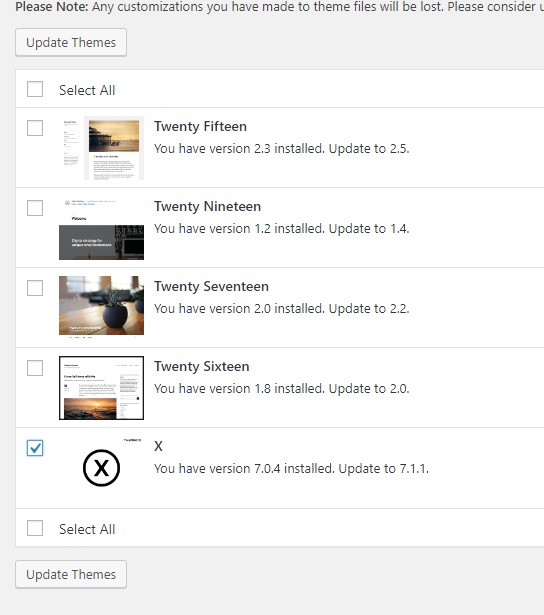
Please go to Admin > Dashboard > Updates and scroll down at the bottom and you should see the themes you can update. Check it and click update themes

Thanks!

Thank you for your answer, and it is working now.

When I first updated to X-theme 7.1.1 the website looked completely broken, no background images, no buttons, sections that where missing etc. But when I updated the Cornerstone plugin too everything was working again. Seems like they only work together with each other.

Thanks,
Maria

You’re welcome, Maria. We’re glad that your site is working now.

This topic was automatically closed 10 days after the last reply. New replies are no longer allowed.